




Image search techniques are the methods that let users find information, products or related content by using an image as the query instead of typed words. Where a text search box expects keywords, an image search engine reads pixels, identifies objects, compares colour histograms and applies deep-learning models to return visually relevant results. The technology has moved from academic laboratories into everyday smartphone cameras, e-commerce platforms and marketing dashboards.
Understanding the different image search techniques matters for three distinct audiences: everyday users who want to track down the original source of a photo or find a product they spotted in the street; marketers and developers who want their images to rank in Google Image Search and drive organic traffic; and business leaders who want to build visual search into their own mobile apps or web platforms to improve customer experience.
This guide covers every major image search method, the leading tools available in 2026, the SEO strategies that bring image traffic to your site, and the AI technology driving it all. Each section links to practical steps you can apply immediately.
What Are Image Search Techniques?
Image search techniques are the approaches — both human-driven and algorithmic — used to retrieve images or find information about an image. The term covers two related but distinct actions: searching for images (finding photos on a topic) and searching by image (using a photo as the query to find its source, similar images or identified objects).
Traditional image retrieval systems relied on metadata: the file name, the surrounding caption, and the alt attribute in the HTML. Those signals are still important today, but modern content-based image retrieval (CBIR) systems go further by analysing the actual pixels. CBIR extracts low-level features such as colour distribution and edge patterns, then compares them mathematically against a large image database.
The generation of AI and deep learning added semantic understanding on top of pixel analysis. A convolutional neural network (CNN) trained on millions of labelled images can classify a query photo as "a golden retriever puppy playing outdoors" rather than simply matching shades of brown. That semantic layer is what makes Google Lens, Pinterest Lens and Amazon Visual Search feel intuitive rather than mechanical.
Why Image Search Matters in 2026
Google reports that visual searches have grown significantly year-over-year as smartphone cameras become the default starting point for many consumer journeys. A shopper who photographs a dress in a café window and immediately finds where to buy it has completed a purchase decision in seconds — no keyword required. For businesses, this shift means that images are no longer supporting content; they are primary discovery surfaces.
From the developer and product perspective, visual search APIs have become readily accessible. Google Cloud Vision AI, AWS Rekognition and Azure Computer Vision all expose REST endpoints that any team can integrate. Our AI development services regularly incorporate these APIs into mobile apps and web products where visual product discovery or content moderation is a core requirement.
Types of Image Search Techniques
Image search is not a single method. The field has evolved into several distinct approaches, each suited to a different purpose. The table below summarises the main categories before each one is explored in depth.
| Technique | Query Type | Primary Use | Leading Tool |
|---|---|---|---|
| Keyword-based image search | Text | Find images on a topic | Google Images, Bing Images |
| Reverse image search | Uploaded image or URL | Find source, detect duplicates | Google, TinEye, Yandex |
| Visual / object search | Camera or photo | Identify objects, shop by photo | Google Lens, Pinterest Lens |
| Similarity search (CBIR) | Sample image | Find visually similar images | Google Images, iStock |
| Multimodal search | Image + text combined | Refined product queries | Google Shopping, Amazon |
| Semantic image search | Natural language about image | AI-powered contextual retrieval | OpenAI CLIP, Google Vertex AI |
Keyword-Based Image Search
Keyword-based image search remains the most common technique. A user types "sunset over mountains" into Google Images, and the engine returns photos ranked by relevance signals including the page's title, the image's file name and its alt text. This technique is powerful for general discovery but requires the publisher to have labelled images accurately.
The ranking factors are well documented: file name, alt text, surrounding text, page authority and image quality all contribute. A site that invests in proper image labelling will consistently outrank competitors whose images carry generic names like "IMG_4521.jpg". This is why image SEO is not an optional add-on but a core part of a content strategy.
Content-Based Image Retrieval (CBIR)
Content-based image retrieval was the first major departure from metadata-only search. CBIR systems analyse the image itself, extracting three types of features:
- Colour features: histograms and colour moments that describe the dominant palette.
- Texture features: patterns calculated using Gabor filters or local binary patterns (LBP).
- Shape features: edge detection maps and contour descriptors.
CBIR remains inside stock image libraries such as Getty and iStock, where editors can retrieve visually similar shots from large archives. The limitation is that CBIR understands what an image looks like but not what it means. A photo of a red poppy and a photo of a red apple might score as similar because both are circular and red.
Reverse Image Search: How It Works and When to Use It
Reverse image search inverts the usual search direction. Instead of typing a query to find images, you submit an image to find information about it. The engine extracts feature vectors from your uploaded photo and compares them against an indexed database of billions of images, returning pages where the same or similar image appears.

Google Reverse Image Search
Google's reverse image search is the most widely used. On desktop, open Google Images, click the camera icon in the search bar and either paste a URL or upload a file. On mobile, pressing and holding an image in Chrome gives a "Search image with Google" option that sends it directly. Google returns:
- Pages where the same image appears
- Visually similar images
- A descriptive label for the image content
- Related topics and entities
TinEye for Copyright and Source Verification
TinEye specialises in finding exact and near-exact copies of an image across the web. It is the preferred tool for copyright verification, journalism and brand protection because it records when each image first appeared and on which domain. A publisher can run a TinEye search to confirm that a photo submitted by a contributor has not been used before. Photographers can track where their work is appearing without permission.
Yandex Images for Detailed Object Matching
Yandex Images uses a different neural network trained heavily on Eastern European and Russian-language content, which often returns matches that Google misses for certain image types — particularly faces, architecture and regional products. Security researchers and investigators sometimes prefer Yandex for its ability to match faces and objects even when the image has been resized, flipped or slightly edited.
Visual Search AI Tools in 2026
Visual search tools have matured from beta features into production-grade products integrated into the most-used apps and platforms. The key distinction is that visual search is camera-first: users point a live camera or upload a photo from their gallery, and the tool identifies what it sees in real time.

Google Lens
Google Lens is the most capable general-purpose visual search tool available to consumers. It is built into Android cameras, the Google app on iOS and Chrome on desktop. Lens can:
- Identify plants and animals from a photo with taxonomy detail
- Translate text in real time by overlaying the translation on the original image
- Solve maths problems shown on paper or a whiteboard
- Identify landmarks and retrieve their Wikipedia article and location
- Shop by photo, matching products from an image to Google Shopping listings
- Scan barcodes and QR codes without a separate app
- Extract text from photos and copy it directly to clipboard
Pinterest Lens
Pinterest Lens is embedded in the Pinterest app and aimed squarely at style and home décor discovery. A user photographs a chair, a dress or a colour palette and Lens returns pins, boards and buyable products that share the visual aesthetic. For interior designers, fashion buyers and consumer goods brands, Pinterest Lens is a high-intent discovery channel worth optimising for.
Bing Visual Search
Microsoft's Bing Visual Search integrates with Bing Chat and allows users to upload an image and ask natural-language questions about it simultaneously. This multimodal approach — image plus language query together — narrows results more precisely than either image or text search alone. Bing also surfaces shopping results, nutritional data for food photos and restaurant menus for dish photos.
Amazon Visual Search
Amazon's "Search by Photo" feature inside the Amazon Shopping app allows users to photograph any product and find it or the closest alternative in Amazon's catalogue. For product brands, this underscores the importance of having high-quality product photography indexed by Amazon and of registering products in Amazon's Brand Registry to ensure correct attribution when visual matches occur.

Image Search for E-Commerce and Product Discovery
Visual search has perhaps its biggest commercial impact in e-commerce. The traditional product search flow requires a user to know the name of an item — "navy blue wide-leg trousers with side pockets" — and type it accurately enough to surface relevant results. Many shoppers cannot name what they want; they know what it looks like. Visual search removes that language barrier.
Research from Gartner has suggested that brands implementing visual and voice search will increase digital commerce revenues by 30% compared to those that do not. The mechanic is straightforward: a customer sees a product in the real world, photographs it, and lands directly on a purchase page — zero friction, zero keyword research required from the user's side.
Implementing Visual Search on Your Platform
Retailers and marketplace operators can add visual search to their own platforms through cloud APIs. The typical integration looks like this:
- Image ingestion: Product images are uploaded and indexed by the visual search service. The API converts each image into a high-dimensional feature vector and stores it.
- Query handling: When a user submits a query photo, it is converted into a feature vector using the same model.
- Nearest-neighbour retrieval: The query vector is compared against the product image index using approximate nearest-neighbour (ANN) algorithms such as FAISS or ScaNN.
- Ranked results: The closest matches are returned, ranked by similarity score and filtered by availability.
Google Cloud Vision Product Search, AWS Rekognition Custom Labels and Azure AI Vision are the three most mature managed services for this pattern. They handle indexing, vector storage and retrieval, leaving your engineering team to focus on the product experience around the results. If your business needs a custom visual search pipeline integrated into an existing e-commerce system, our web development team can scope the build from API selection through to front-end delivery.
How to Optimise Images for Search
Optimising images for search covers two separate goals: making images findable in image search results and ensuring they load fast enough not to hurt Core Web Vitals scores. Both goals work together because page speed is itself a ranking signal.

Use Descriptive File Names
File names are one of the first signals Google reads about an
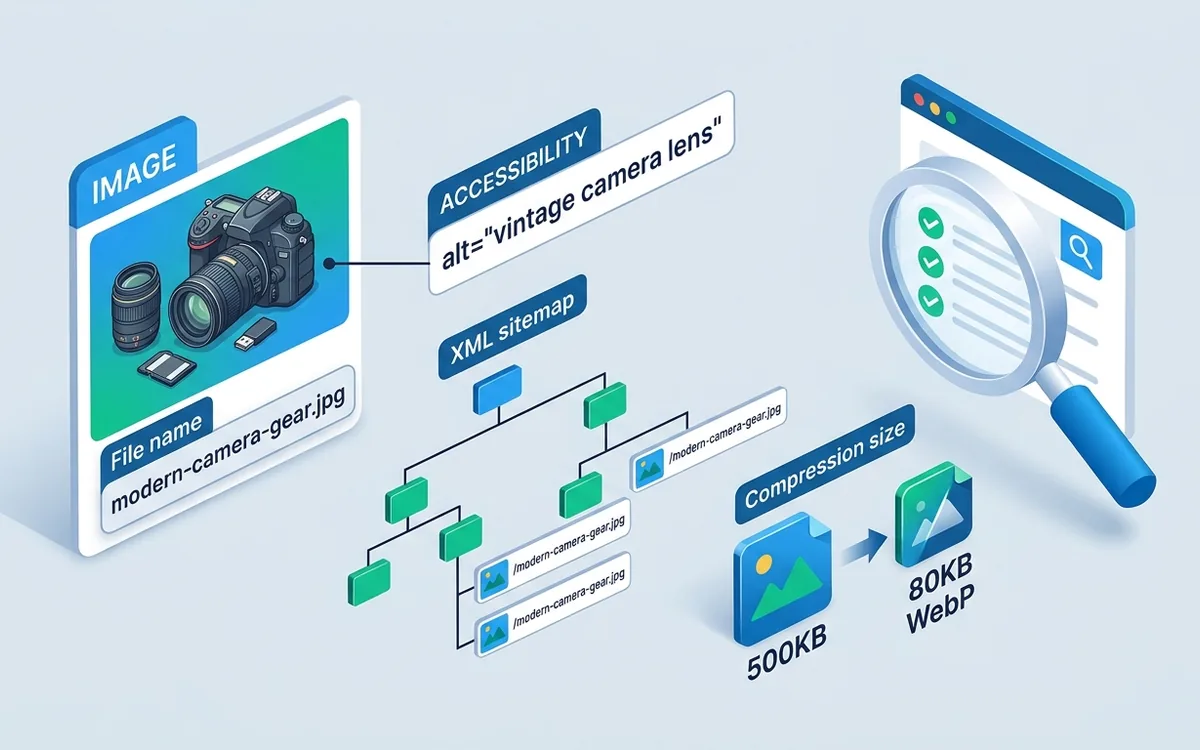
image. A file named
red-leather-crossbody-bag.webp tells the crawler
far more than DSC00453.jpg. Use hyphens to separate
words, keep the name under 60 characters and match it closely to
the primary keyword the page targets. Avoid keyword stuffing in
file names — one or two descriptive terms outperform a long
string of search phrases.
Write Accurate and Descriptive Alt Text
Alt text serves two purposes: it describes the image to screen
readers for accessibility, and it gives search engines a text
description to index. Write alt text as a brief factual
description of what the image shows, not a list of keywords. For
example:
alt="woman using Google Lens on iPhone to identify a
                  houseplant indoors"
is better than
alt="image search visual search Google Lens AI".
Keep alt text under 125 characters. Decorative images that add
no information — such as dividers and icons — should use an
empty alt attribute (alt="") so screen readers skip
them.
Choose the Right Format and Compress Properly
WebP is the recommended format for most web images in 2026. It offers 25–35% smaller file sizes than JPEG or PNG at equivalent visual quality. AVIF is a newer alternative with even better compression but slightly lower browser support. Use JPEG for high-detail photographs when WebP is not an option, and PNG only for images that require lossless quality or transparency.
| Format | Compression | Transparency | Browser Support | Best For |
|---|---|---|---|---|
| WebP | Lossy / Lossless | Yes | 95%+ | All web images |
| AVIF | Lossy / Lossless | Yes | ~88% | High-resolution photography |
| JPEG | Lossy | No | 100% | Fallback for older browsers |
| PNG | Lossless | Yes | 100% | Logos, icons, screenshots |
| SVG | Vector | Yes | 100% | Logos, illustrations, icons |
Target a maximum file size of 150–200 KB for large hero images and under 100 KB for inline blog images. Tools such as Squoosh, Sharp (for Node.js pipelines) and ImageOptim will compress without visible degradation at typical web dimensions.
Specify Width and Height Attributes
Setting explicit width and
height attributes on every
<img> element prevents cumulative layout
shift (CLS), one of the Core Web Vitals metrics Google uses to
rank pages. When the browser knows the image dimensions before
the file loads, it reserves the correct space in the layout and
the page does not jump as images appear.
Implement Lazy Loading
Add loading="lazy" to all images that are below the
visible fold. This tells the browser to defer downloading those
images until the user scrolls close to them, reducing initial
page weight and speeding up the Largest Contentful Paint (LCP)
measurement. The hero image at the top of the page should use
loading="eager" (or no attribute) since it must
load immediately for a good LCP score.
Image Search SEO Best Practices
Beyond individual image attributes, a broader set of on-page and technical strategies governs how well your images rank. These practices align with Google's guidance in its Google Images best practices documentation.
Add ImageObject Structured Data
Including ImageObject structured data in your
JSON-LD schema helps Google understand the content, licence and
authorship of images. For blog articles, the
BlogPosting schema should reference the featured
image using an image property. Product pages
benefit from Product schema that includes multiple
product images. Well-structured data can earn
rich results in image search, including product
price badges and availability labels.
Create and Submit an Image Sitemap
An image sitemap tells Google about images that might not be
discoverable through normal crawling, particularly those loaded
by JavaScript. Add an <image:image> extension
to your existing XML sitemap for each URL that contains
important images. The sitemap entry should include the image
URL, its title and optionally its caption and licence URL.
Place Images in Contextually Relevant Positions
Google reads the text surrounding an image to understand its topic. Place images after the paragraph that discusses them, and ensure the nearest heading or paragraph mentions the image's subject. An image of a "convolutional neural network diagram" placed directly after a paragraph explaining CNNs receives a stronger relevance signal than the same image placed at the top of a page about something else entirely.
Enable Google Discover Image Eligibility
Google Discover displays article thumbnails in mobile feeds when
the page contains a
high-quality image of at least 1200 pixels wide
and the site has enabled the
max-image-preview:large robots meta tag. Add this
to your head section:
<meta name="robots"
                    content="max-image-preview:large">
Without this tag, Google falls back to small thumbnails in Discover, significantly reducing click-through rates from that channel.
AI Image Recognition Technology Explained
The intelligence behind modern image search comes from deep convolutional neural networks trained on tens of millions of labelled examples. Understanding how the technology works helps developers choose the right tools and helps content creators understand what signals they are optimising for.
How Convolutional Neural Networks Process Images
A CNN takes an image as input and passes it through a series of convolutional layers. Each layer applies a set of learned filters — small matrices that detect edges, corners, gradients and eventually more complex patterns such as eyes, wheels or leaves. As the image moves deeper into the network, filters respond to increasingly abstract features.
The final layers convert these features into a compact numeric vector — a feature embedding — that represents the image's visual content in a high-dimensional space. Images that look similar produce embeddings that are close together in this space. The similarity search at retrieval time is a mathematical nearest-neighbour lookup in that embedding space, which can be computed extremely quickly even across billions of indexed images using FAISS-style approximate algorithms.
This same technology underlies the neural network foundations used in many artificial intelligence applications. The embeddings approach also forms a core part of how modern generative AI models like DALL-E and Stable Diffusion understand and produce images.
CLIP: Bridging Images and Language
OpenAI's CLIP (Contrastive Language–Image Pretraining) model represents a leap forward in image search because it creates a shared embedding space for both images and text. A CLIP model can compare an image embedding against a text embedding directly, making queries like "a photo of a cat sitting on a skateboard" return relevant images without any image-specific labels.
CLIP-based retrieval is now used in production by several stock image services and creative tools. It is the foundation of semantic image search: you describe what you want in natural language, and the system finds images that match the concept, not just images whose metadata contains your words.
Vector Databases for Scalable Image Retrieval
As product catalogues grow into the millions, brute-force similarity search becomes impractically slow. Vector databases such as Pinecone, Weaviate, Qdrant and Milvus store image embeddings with indexing structures (HNSW graphs, IVF indices) that return approximate nearest neighbours in milliseconds even across hundreds of millions of vectors. This infrastructure is what allows e-commerce giants to run real-time visual search at scale.
For teams building AI-powered products that incorporate image search, understanding training, validation, and test data splits is essential when fine-tuning retrieval models on a custom product catalogue. Well-curated training data is the difference between a visual search that finds the right product 95% of the time and one that surfaces irrelevant results half the time.
Real-World Use Cases for Image Search
The practical applications of image search techniques extend across industries. Here are the domains where they create the most measurable value.
Fashion and Retail
Fashion is the sector where visual search has had the most dramatic impact. ASOS, Zalando and H&M all offer "search by photo" features in their apps. A customer photographs an outfit on a friend or a celebrity photo from a magazine and finds matching or similar items for immediate purchase. Conversion rates from visual search sessions are typically higher than from text search because the user's intent is already well defined — they know what they want; they just cannot name it.
Travel and Landmark Identification
Google Lens identifies thousands of landmarks globally, returning the building's name, historical background and Wikipedia entry from a single photo. Travel apps integrate image recognition to help visitors navigate foreign cities, identify museum exhibits and read menus in unknown scripts. For travel businesses, this means that images of their properties and destinations should be geotagged and labelled accurately to appear in Lens results.
Healthcare and Scientific Research
Medical image analysis uses CNNs trained on annotated radiology scans, histopathology slides and dermatology photographs to flag anomalies for clinician review. Dermatology apps that classify skin lesions from a smartphone photo have achieved diagnostic accuracy comparable to dermatologists in controlled studies for specific lesion types. Scientific databases use image similarity search to match molecular structures, plant specimens and geological samples across global archives.
Intellectual Property and Brand Protection
Brand teams use reverse image search to monitor unauthorised use of product photos, logos and advertising creatives across the web. Tools including BrandShield and Mention combine web crawling with image similarity algorithms to alert brand owners when their visual assets appear on counterfeit product pages or in misleading advertising. TinEye's API offers a programmatic way to build this monitoring into a brand's own marketing operations stack.
Agriculture and Environmental Monitoring
Precision agriculture platforms use image recognition on drone and satellite imagery to identify crop diseases, pest infestations and nutrient deficiencies at field scale. Conservation organisations use wildlife camera trap images processed by CNN-based classifiers to count animal populations across protected areas. These applications share the same technology stack as consumer image search but are trained on specialist domain datasets.
Choosing the Right Image Search Tool for Your Needs
With dozens of tools available, the right choice depends on your use case. This reference table covers the most commonly used options.
| Tool | Best For | Free Tier | API Available |
|---|---|---|---|
| Google Images / Lens | General visual search, shopping, translation | Yes (unlimited) | Yes (Cloud Vision) |
| TinEye | Copyright verification, source tracing | Yes (limited searches) | Yes (paid) |
| Yandex Images | Face and object matching, regional content | Yes | No |
| Pinterest Lens | Fashion, home décor discovery | Yes (in-app) | No (private) |
| Bing Visual Search | Multimodal search, shopping | Yes | Yes (Bing Search API) |
| Amazon Visual Search | Product discovery on Amazon | Yes (in-app) | Yes (Rekognition) |
| Google Cloud Vision AI | Developer API for image classification | Yes (1,000 req/mo) | Yes |
| AWS Rekognition | Developer API, face detection, moderation | Yes (5,000 img/mo) | Yes |
Pro tip: For custom visual search in a product catalogue, start with Google Cloud Vision Product Search or AWS Rekognition Custom Labels. Both services handle the embedding generation and nearest-neighbour index management, letting your team focus on the search experience rather than the ML infrastructure.
Image Search for Digital Marketers
Digital marketers benefit from image search in two directions: driving traffic through Google Image Search, and monitoring brand presence through reverse image search. A well-optimised image on a high-authority page can appear in image search results for years, sending a steady stream of visitors who click through to the original article or product page.
The key metrics to track for image search performance inside Google Search Console are impressions, clicks and click-through rate (CTR) from image results. Navigate to Search Results, filter by Search Type: Image, and analyse which images drive the most clicks. Pages with high impressions but low CTR usually need better alt text, more contextual surrounding copy or higher-resolution images.
For innovative marketing campaigns, custom-designed infographics and data visualisations earn significant image search traffic because they are frequently embedded by other sites with attribution links. Creating original visual assets — not just licensing stock photos — builds a sustainable image SEO advantage that generic content cannot replicate.
Conclusion
Image search techniques have expanded from a narrow academic field into a broad set of practical tools that touch e-commerce, marketing, journalism, healthcare and scientific research. For everyday users, reverse image search and visual search tools like Google Lens provide instant answers that text queries cannot. For businesses and developers, the same underlying AI technology — convolutional neural networks, feature embeddings and approximate nearest-neighbour retrieval — powers custom product discovery, brand protection and large-scale content moderation.
The practical takeaways are clear. Optimise every image with a
descriptive file name, accurate alt text, correct dimensions and
a modern format such as WebP. Implement ImageObject structured
data to support rich results. Submit an image sitemap. Enable
max-image-preview:large for Google Discover
eligibility. And track image search performance separately in
Search Console so you can see what is working.
If your product needs a custom visual search capability — whether that is a "search by photo" feature for a retail catalogue, a content moderation pipeline or an AI-powered image tagging system — contact O2SOFT to scope the build. Our team has experience integrating the leading cloud vision APIs and vector databases into production web and mobile applications. Visit the O2SOFT homepage for the full range of AI and software development services.
Frequently Asked Questions
What is reverse image search and how does it work?
Reverse image search lets you upload a photo or paste an image URL to find visually similar images, their original source or related web pages. Search engines extract colour histograms, edge maps and deep-learning feature vectors from the image, then match those features against a large indexed database. Google Images, TinEye and Bing Visual Search all use this method.
What is the difference between keyword search and visual search?
Keyword search uses text terms to retrieve documents and web pages ranked by relevance. Visual search uses an image as the query instead of words, matching based on colours, shapes, textures and objects recognised by AI models. Visual search is more intuitive when users cannot name what they are looking for.
Which image search technique is best for finding the original source of a photo?
TinEye is best for tracing a photo back to its original upload date and source. It maintains a dedicated index of billions of images and returns exact and near-exact matches with their first appearance date, which is valuable for copyright verification and journalism.
How do I optimise images for Google Image Search?
Optimise images for Google Image Search by using descriptive file names (e.g., blue-running-shoes.webp), writing accurate alt text, compressing the file to under 200 KB, using WebP format, adding ImageObject structured data, and ensuring the page loads fast and is mobile-friendly.
What is Google Lens and what can it do?
Google Lens is an AI-powered visual search tool that identifies objects, plants, animals, barcodes, text and landmarks through a smartphone camera or uploaded image. It can translate text in photos, compare shopping prices, identify dog breeds, solve maths problems and find similar products online.
Can image search be used for e-commerce product discovery?
Yes. E-commerce platforms including Pinterest, Google Shopping and Bing Visual Search allow shoppers to photograph a product and find it or visually similar alternatives for sale online. Retailers that implement visual search typically see higher conversion rates because users find products without needing to know their exact name.
What file format is best for images used in search?
WebP is the best format for web images used in search because it delivers the same visual quality as JPEG or PNG at 25–35% smaller file sizes, which speeds up page load times and improves Core Web Vitals scores. AVIF is a newer alternative with even better compression but slightly lower browser support.
How does AI-powered image search work?
AI-powered image search uses convolutional neural networks (CNNs) to convert images into high-dimensional feature vectors. The system compares the query vector against a database of pre-indexed image vectors using nearest-neighbour algorithms. Models trained on millions of labelled images learn to identify objects, scenes and products regardless of angle, lighting or partial occlusion.