


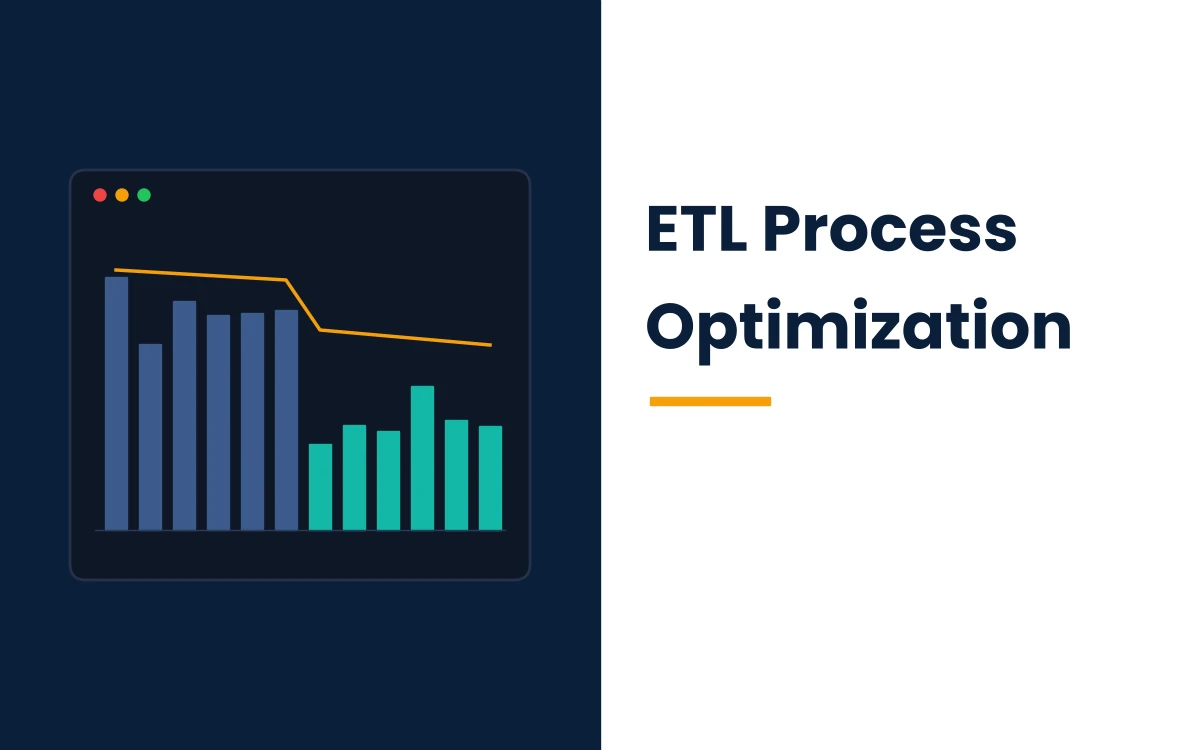
ETL process optimization is the work of finding where an extract, transform, load (ETL) pipeline loses time and money, then fixing those bottlenecks. The payoff is fresher data at a lower cost. Most gains come from moving less data, processing it in sets instead of rows, and loading it in bulk.
A tuned pipeline delivers fresher dashboards, shorter batch windows and lower cloud bills. Engineers spend fewer nights rerunning failed jobs, while analysts stop questioning numbers that change between reports. The same discipline applies to nightly warehouse loads, data lake ingestion, machine learning feature pipelines and one-off migrations such as moving SAP HANA data into Amazon Redshift.
Every optimization effort touches five parts of a pipeline: extraction, transformation, load, orchestration with monitoring, and cost control. Each part has its own failure patterns, so a fix that helps one stage rarely solves a problem rooted in another. Measurement comes before any change, since a pipeline without a baseline gives no way to prove a fix worked.
What Is ETL Process Optimization?
The practice reduces a pipeline's runtime, compute cost and failure rate while keeping its output correct. Teams baseline each run, find the slowest or most expensive stage, change that stage, and measure again.
The classic ETL pattern pulls data from a relational database management system (RDBMS) or another source, transforms it on a separate engine, then loads the results. Extract, load, transform (ELT) reverses the last two steps and runs transformations inside the warehouse after raw data lands. Modern stacks mix both patterns: a team often cleanses sensitive fields before loading, then builds reporting models inside the warehouse with SQL.
The pattern you run decides where tuning effort pays off. ETL pipelines usually slow down on the transformation engine, while ELT pipelines usually slow down on warehouse concurrency and query design.
Why Do ETL Pipelines Slow Down?
ETL pipelines slow down for seven common reasons, led by full-table reloads, row-by-row processing and unmonitored data growth. A job that finishes in 20 minutes at launch can stretch past its batch window within a year without a single code change.
- Full reloads pull an entire source table every run, so runtime grows with table size instead of with new data.
- Row-by-row processing sends one statement per record, which multiplies network round trips and transaction overhead.
- Data skew sends most rows to one worker, leaving other workers idle while one task runs far longer than its peers.
- Small files force engines to open thousands of objects, and per-file overhead outweighs the actual read time.
- Resource contention appears when ETL jobs compete with dashboards and ad hoc queries on the same cluster.
- Uncontrolled dependencies chain jobs in strict sequence even when several could run in parallel.
- Missing monitoring hides gradual regressions until a run fails or a stakeholder spots stale data.
How Do You Baseline an ETL Pipeline Before Changing It?
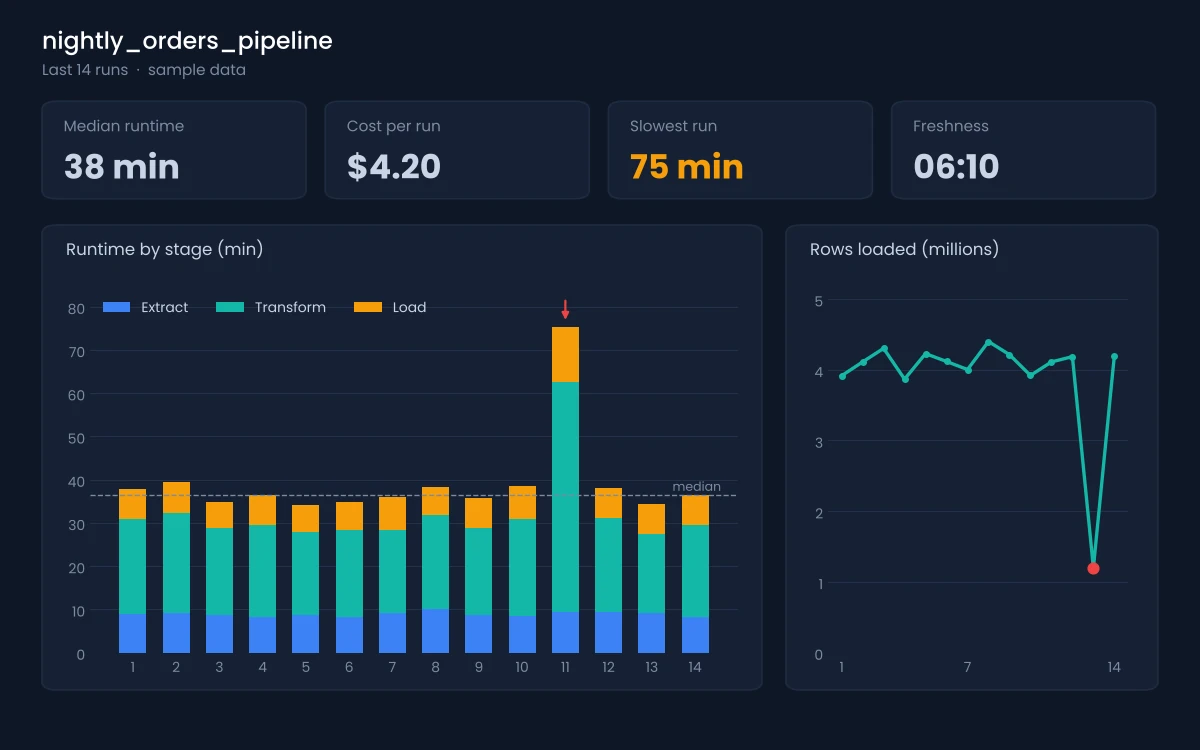
Baseline an ETL pipeline by recording runtime per stage, rows processed, compute cost per run, failure rate and data freshness for at least two weeks. Those five numbers show which stage deserves attention first.
Extract transform load best practices start with per-stage timing, since one end-to-end duration hides where the time goes. Log start and end times for extraction, every transformation step and every load, then store them in a queryable table. Pair each run with its row count and compute cost. A slow run caused by a volume spike then looks different from one caused by a bad query plan.
Set alert rules against the baseline rather than fixed thresholds. Flag any run that exceeds its recent norm by a clear margin. Sudden drops in row counts deserve an alert too, since they often signal a broken source extract. Cost per run and freshness work best when written as formal KPI examples with an owner, a formula and a target.
How Do You Optimize Data Extraction?
Optimize extraction by pulling only new or changed rows, only the columns you need, and only at a rate the source system can handle. Extraction is often the cheapest stage to fix and the one with the largest effect on everything downstream.
- Incremental loading: track a high-water mark such as an updated timestamp or an increasing ID, and extract rows above it on each run.
- Overlap windows: reprocess a short window behind the watermark, since late-arriving rows otherwise slip past an incremental extract.
- Change data capture (CDC): read inserts, updates and deletes from the source database log, which captures deletes that timestamp filters miss.
- Column projection: select named columns instead of every column, cutting network transfer and memory use.
- Pushdown filters: apply WHERE clauses inside the source query so the database filters rows before they cross the network.
- Source protection: schedule heavy extracts outside peak hours and cap parallel connections to production databases and rate-limited APIs.
CDC adds operational work, including log retention and schema change handling. Timestamp-based increments suit sources where deletes are rare or soft-deleted with a flag.
Worked Example: Full Reload vs Incremental Extract
Consider a hypothetical orders table holding 500 million rows, where about 2 million rows change each day. A full reload moves all 500 million rows every night, and the job keeps growing as the table grows. An incremental extract with a one-hour overlap window moves roughly 2 million rows, about 0.4% of the full volume. Runtime and network transfer now track daily activity instead of total history, and the source database spends far less time serving the extract.
How Do You Speed Up Data Transformation?
Speed up transformation with set-based SQL, pushdown to the strongest engine, early skew fixes and pre-aggregated datasets. Transformation logic usually holds the largest share of runtime in classic ETL pipelines.
Set-Based Processing Over Row-by-Row Processing
Set-based processing applies one statement to millions of rows at once, letting the engine plan joins and parallelize work. Row-by-row processing, such as a cursor loop or a per-record function call, forces the engine to repeat the same work for every record. Rewriting a loop as a single join or window function commonly cuts runtime from hours to minutes on large tables.
Pushdown and Engine Awareness
Pushdown moves transformation work to the system that runs it fastest, often the warehouse or the source database. Engine awareness means writing logic in the form an engine optimizes well. Built-in SQL and DataFrame functions run inside the engine's optimizer, while custom user-defined functions often bypass it and process rows one at a time.
Fixing Skew
Skew happens when a join or group-by key concentrates rows on a few values, such as a default customer ID shared by millions of guest orders. In Apache Spark, Adaptive Query Execution has been on by default since version 3.2.0 and splits skewed sort-merge join partitions into smaller tasks. Spark treats a partition as skewed when it is larger than five times the median partition size and larger than 256 MB. Salting a hot key or filtering placeholder values before the join fixes skew that adaptive execution misses.
Pre-Aggregate Once, Query Many Times
Pre-aggregation builds daily, weekly and monthly datasets once, so reports read summarized rows instead of recalculating from raw events. A daily dataset of sales by store replaces millions of transaction rows for most dashboard queries. Materialized views and incremental models keep those summaries current without full rebuilds. The same approach helps feature engineering pipelines, where machine learning models reuse the same rolling aggregates across training runs.
Data Cleansing and Quality Gates
Data cleansing belongs as close to the source as possible, since bad rows that reach target tables spread errors into every report built on them. Route rows that fail validation into a quarantine table with the reason attached, and let the rest of the load continue. Quality gates check row counts, null rates, duplicate keys and accepted value ranges before data is published. Clean, validated pipelines matter even more for AI training data, where silent errors turn into model errors.
How Do You Make Data Loading Fast and Safe?
Make loading fast and safe with bulk loads, partitioned loads, idempotent load logic and a staging layer between raw input and target tables. Load design decides whether a failed run can be retried in minutes or needs manual cleanup.
- Bulk load: write data with the warehouse's native bulk command instead of single-row INSERT statements.
- Partitioned load: load and replace data one partition at a time, such as one date, so reruns touch only the affected slice.
- Idempotent load: design each run to produce the same result when repeated, using MERGE or delete-and-insert by partition.
- Staging: land data in staging tables, validate it there, then move it into target tables in one step.
- Single transaction: wrap multi-step load logic in one transaction, so readers never see a half-loaded table.
The Apache Airflow documentation advises that tasks produce the same outcome on every rerun and warns that INSERT during a rerun can create duplicate rows. The same rule applies to any orchestrator, since retries happen automatically after transient failures.
How Should You Orchestrate and Monitor ETL Workflows?
Orchestrate ETL workflows with real dependency graphs, controlled parallelism and run-level monitoring that tracks duration, volume, cost and freshness. Orchestration problems rarely fail loudly; they waste time through unnecessary waiting.
Model dependencies explicitly, so independent jobs run in parallel and downstream jobs start as soon as their inputs finish. Use resource pools to cap how many tasks hit one database or API at the same time. Replace fixed-time schedules with event-driven triggers where possible, such as starting a transform when its source file lands.
Observability tells you whether a change held up in production. Data lineage shows which reports depend on a failing table, while run history shows whether a fix held or the regression returned. Teams adding AI-based anomaly detection to this layer can review how AI agent development handles alert triage across monitoring systems.
How Do You Cut ETL Cost Without Slowing Pipelines?
Cut ETL cost by right-sizing compute, suspending idle resources, storing data in columnar formats and tracking cost per pipeline run. Performance and cost move together; a faster job on the same hardware costs less.
- Right-size clusters to the measured workload instead of the peak someone guessed at launch.
- Turn on auto-suspend or auto-termination so idle compute stops billing between runs.
- Store analytical data in columnar formats such as Apache Parquet, which organizes data by column and compresses it for efficient reads.
- Tag every job with an owner and pipeline name so cost reports show which workload drives spend.
- Archive or delete intermediate data that no job reads after a set retention period.
ETL Amazon Redshift Best Practices
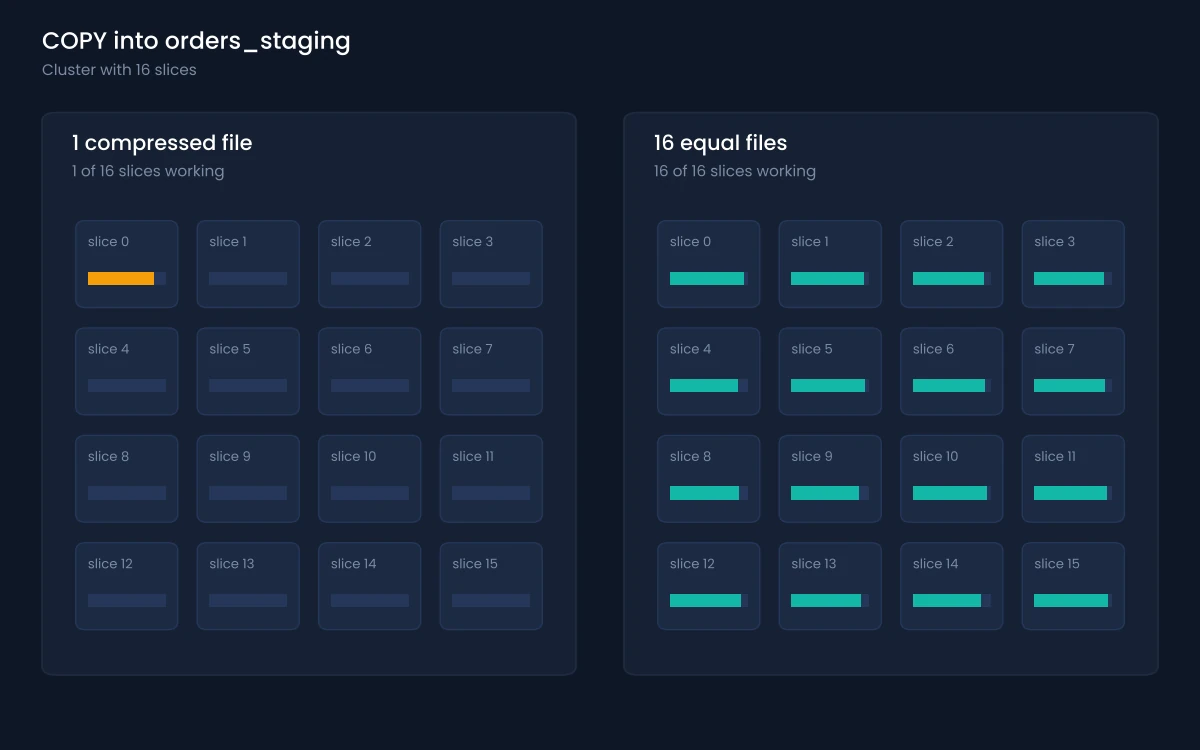
ETL Amazon Redshift performance depends on parallel COPY loads, staging tables, workload management and automated table maintenance. Amazon Redshift documentation describes each of the practices below.
- Split load files so their count is a multiple of the cluster's slices, each between 1 MB and 1 GB after compression.
- Use one COPY per table, since multiple concurrent COPY commands into one table force a slower serialized load.
- Load through temporary staging tables with explicit keys and compression, then move rows with ALTER TABLE APPEND, which avoids copying data.
- Wrap multi-step ETL logic in one transaction, since repeated commits add cost and lock contention.
- Give ETL its own Workload Management (WLM) queue with a set priority, separate from dashboard queries.
- Turn on Concurrency Scaling for write queues on RA3 nodes; each cluster earns up to one hour of free scaling credits per day.
- Let Automatic Table Optimization set AUTO sort and distribution keys, while automatic VACUUM and ANALYZE handle table maintenance in the background.
- Precompute heavy reporting joins and aggregations with Materialized Views that refresh on a schedule or automatically.
- Use UNLOAD for large extracts, since UNLOAD writes to S3 in parallel while a large SELECT bottlenecks on the leader node.
Redshift Spectrum handles one-time backfills by querying files in S3 directly instead of loading them. Transformations written as Python UDFs need a migration plan now. Redshift stopped accepting new Python UDFs on November 1, 2025, and support ends after June 30, 2026.
How Does Data Lake Performance Tuning Work?
Data lake performance tuning works by reducing the bytes each query scans through partitioning, right-sized files, columnar storage and file-level statistics. A data lake has no indexes in the database sense, so file layout does the work indexes would do.
Partition tables on the columns most queries filter on, usually a date, and avoid partitioning on high-cardinality columns that create millions of tiny folders. Compact small files into larger ones on a schedule, since a query over 100,000 small objects spends more time opening files than reading data. Columnar formats let engines skip columns a query never selects, and per-file statistics let engines skip whole files whose value ranges fall outside the filter. Open table formats add snapshot isolation and compaction tools on top of plain object storage, which simplifies concurrent writes from several pipelines.
How to Build an ETL Pipeline From SAP HANA to Amazon Redshift
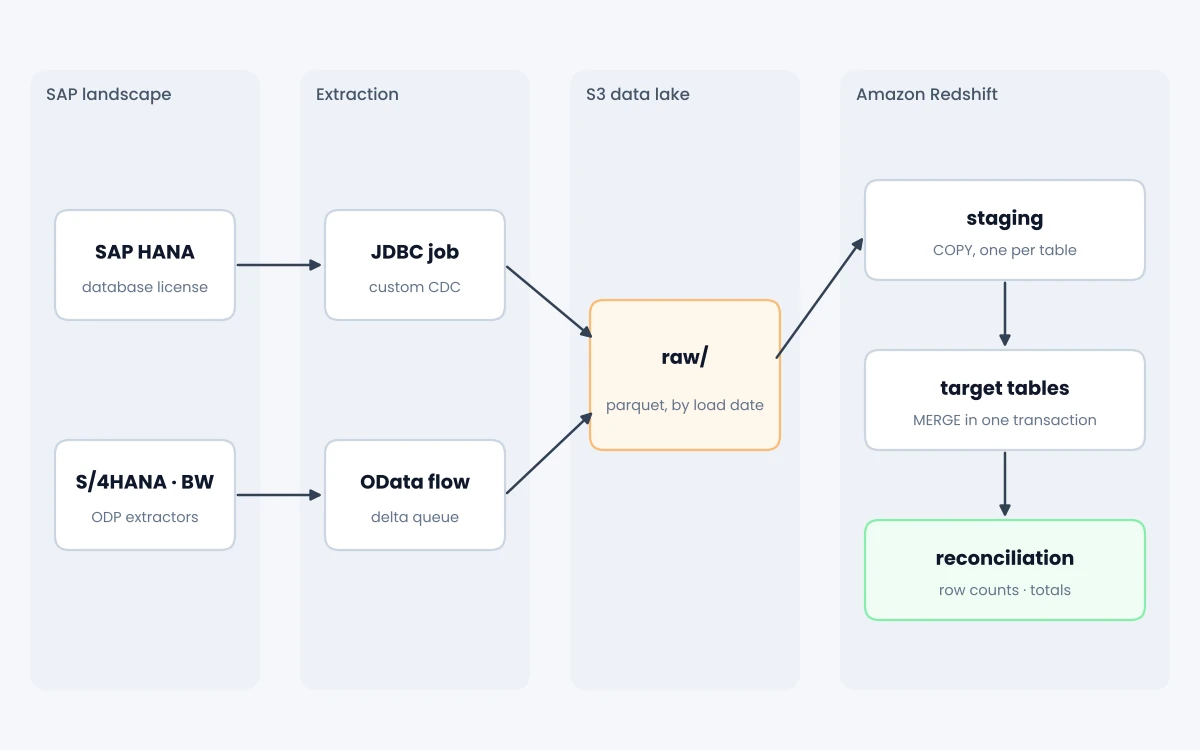
To build an ETL pipeline from SAP HANA to Amazon Redshift, confirm the license, pick an extraction path, land data in S3, then merge it in Redshift. The license check comes first, since it rules some extraction methods in or out.
- Confirm the SAP HANA license first, since runtime licenses and RISE with SAP installations restrict direct database-level extraction.
- Choose database-level extraction for HANA tables and views, or application-level extraction through OData services and the Operational Data Provisioning (ODP) framework.
- Design change data capture early: ODP supports delta queues, while database-level extraction needs custom timestamp or change-table logic.
- Land raw extracts in S3 as compressed columnar files partitioned by load date, so reruns read only the needed slice.
- Load each table into Redshift staging with one COPY command, using evenly sized files for parallel loading.
- Merge staged inserts, updates and deletes into target tables in one transaction, keeping every load idempotent.
- Reconcile row counts and financial totals between SAP and Redshift for every load before publishing data.
- Schedule all steps as one dependency graph, with alerts on runtime, row count swings and failed reconciliations.
Best ETL Tool: SAP HANA to Redshift Options Compared
No single best ETL tool fits every SAP HANA to Redshift project. License type, CDC needs and the choice between raw tables or business objects decide the fit, and four common paths cover most projects.
| Option | Extraction method | Change data capture | Best fit |
|---|---|---|---|
| AWS Glue with a SAP HANA connection | Database-level JDBC reads of tables, views or custom queries | Custom design required | Teams with database-level HANA licenses and Spark skills |
| Amazon AppFlow SAP OData connector | Application-level OData services, including ODP providers | Full and incremental transfers through SAP delta queues | S/4HANA, ECC, BW and BW/4HANA sources with ODP-enabled extractors |
| SAP Datasphere or SAP Data Services | SAP-native replication and datastores for S3 and Redshift | Built into SAP replication features | Organizations standardized on SAP tooling or bound by license terms |
| Third-party connectors from AWS Marketplace | Prebuilt Glue connectors with vendor-managed drivers | Varies by vendor | Teams that want packaged connectivity and vendor support |
What Is the AWS Recommended ETL for SAP HANA to Redshift?
AWS guidance does not name one recommended tool; it maps each extraction pattern to a service. AWS guidance for SAP data integration lists database-level extraction through AWS Glue, application-level extraction through Amazon AppFlow, and SAP-native options that write to S3 or Redshift. The AWS Glue path needs AWS Glue 4.0 or later with credentials in AWS Secrets Manager. The connector does not support HANA databases on runtime-only licenses or RISE installations.
Which Tool Fits a One-Time Migration?
For a one-time move, pick the simplest path your license allows. Ongoing CDC matters less here than a clean full extract. Plan for one full historical load, a short delta catch-up, and a reconciliation sign-off before cutting reports over to Redshift.
Which ETL Process Tools Help With Optimization?
ETL process tools fall into four groups: orchestrators, managed cloud integration services, enterprise integration suites and streaming engines. Every group supports incremental loads and parallel work, so pipeline design drives results more than the product choice.
- Orchestrators such as Apache Airflow schedule jobs, manage dependencies and retry failed tasks.
- Managed cloud services such as AWS Glue, Azure Data Factory and Google Cloud Dataflow run serverless extraction and transformation.
- Enterprise suites such as Informatica PowerCenter, IBM DataStage, Microsoft SSIS, Oracle Data Integrator and Talend offer visual mapping with pushdown options.
- Flow and streaming tools such as Apache NiFi move data continuously between systems with back-pressure control.
Pick the group that matches your workload pattern first, then compare products inside it on connectors, pushdown support, pricing model and monitoring.
How Do You Tune an ETL Process on Oracle Sources?
Oracle sources reward the same extraction discipline with a few database-specific habits. Extract with bind variables and indexed filter columns, reading from a standby or replica where one exists. Log-based CDC replaces repeated full scans of large tables. Bulk fetch sizes matter too, since small default fetch sizes add round trips on every extract.
What Are the Most Common ETL Performance Issues?
The most common ETL performance issues are long processing time, duplicate rows after retries, stale data and runaway cost. Each symptom points to a different pipeline stage and a different first fix.
| Symptom | Likely cause | First fix |
|---|---|---|
| Runtime grows every month | Full reloads on growing tables | Switch to incremental extraction |
| One task runs far longer than others | Data skew on a join key | Salt or filter the hot key |
| Duplicate rows after a retry | Non-idempotent INSERT logic | Use MERGE or partition overwrite |
| Loads take hours on a large cluster | One large file or concurrent COPY commands | Split files and use a single COPY |
| Dashboards slow during loads | ETL and reporting share one queue | Separate workloads into queues |
| Cloud bill rises with flat volume | Idle compute or oversized clusters | Auto-suspend and right-size |
A 90-Day ETL Optimization Plan
A 90-day plan splits optimization into three 30-day phases: measure, fix the largest bottlenecks, then harden and automate. The plan keeps teams from rewriting pipelines before they know where time goes.
- Days 1 to 30, measure: add per-stage logging, capture two weeks of baseline data, and rank pipelines by runtime, cost and business impact.
- Days 31 to 60, fix: apply targeted changes to the top three bottlenecks, then measure each change against the baseline.
- Days 61 to 90, harden: make loads idempotent, add quality gates and regression alerts, and document runbooks so fixes survive staff changes.
Governance keeps those gains in place after the project ends. Clear ownership and review rules, the core of AI and data governance, stop new pipelines from reintroducing old bottlenecks.
When Should You Hire ETL Optimization Consultants?
Hire ETL optimization consultants when pipelines keep missing service-level agreements or costs rise faster than data volume. A migration that needs skills your team lacks, such as SAP HANA to Redshift, is another trigger. Outside help pays off most for a fixed-scope assessment followed by targeted fixes.
Look for consultants who start with measurement, explain trade-offs in plain terms, and leave documentation your team can maintain. Ask for examples of baselines and before-and-after metrics from past work rather than general claims. The same checks used when choosing a technical partner apply here: references, delivery process, communication and ownership of the final code.
O2SOFT builds data pipelines as part of its data engineering services and custom software development work. The full service list and published case studies show the platforms and industries the team has worked with.
Conclusion
ETL process optimization starts with a baseline that shows where time and money go. Per-stage timing, row counts, cost per run and freshness show which part of the pipeline deserves attention first.
Extraction gains come from incremental loads and change data capture. Transformation gains come from set-based logic and skew fixes, while load gains come from bulk, partitioned and idempotent writes. Orchestration, monitoring and cost tracking keep those gains from slipping as data grows. On Amazon Redshift, parallel COPY loads, staging tables and separate workload queues carry most of the improvement. For SAP HANA sources, the license type and CDC needs decide which extraction path fits.
Frequently Asked Questions
How long does ETL optimization take?
Targeted ETL optimization takes 30 to 90 days for most teams, from baselining through hardening. Single fixes such as file splitting or incremental extraction often show results within days, while architectural changes take longer.
Is ELT faster than ETL?
ELT is often faster when the warehouse has more compute than a separate transformation engine. ETL stays the better choice when sensitive data must be cleansed or masked before it reaches the warehouse.
What are the most important ETL best practices?
The most important ETL best practices are incremental extraction, set-based transformations, idempotent bulk loads and per-stage monitoring. Together they cut runtime, prevent duplicates and expose regressions early.
What is the best ETL tool for SAP HANA to Amazon Redshift migration?
The best ETL tool for SAP HANA to Amazon Redshift migration depends on your license and source type. Database-level licenses suit AWS Glue, while ODP-enabled S/4HANA or BW sources suit the Amazon AppFlow SAP OData connector.
How do you reduce ETL processing time?
Reduce ETL processing time by extracting only changed rows, replacing row-by-row logic with set-based SQL, fixing skew and loading in parallel. Measure each stage first so the effort goes to the slowest step.
What is an example of ETL tuning in practice?
A common example replaces a nightly full reload of a large orders table with an incremental extract of changed rows. Runtime then tracks daily order volume instead of total table size, and the warehouse load shrinks to a small fraction of its former size.