


AI assistants for productivity are tools that turn a plain-language request into finished work, such as a drafted email, a meeting summary or a moved calendar slot. Each assistant reads your instruction through a large language model (LLM), pulls context from your files or apps, then returns a result you can accept, edit or reject.
The main benefits are measurable time savings on writing, summarizing and scheduling, fewer small decisions during the day, plus quicker access to information buried in inboxes. Controlled studies from MIT and Harvard Business School recorded large gains on well-defined tasks, while national surveys show smaller average savings once researchers measure real workplaces.
People use these tools for 8 recurring jobs: email triage, calendar scheduling, meeting notes, writing, research, knowledge search, task automation and coding. Under the hood, nearly every product combines the same 5 parts: a language model, a context layer, app integrations, an action layer and a chat or voice interface.
The guide below explains how each part works, what the evidence says about real productivity gains and how the leading assistants compare in 2026. Later sections cover the best option for an iPhone, a rollout plan for businesses and the numbers worth tracking once the tool is live.
Key Takeaways
- AI assistants turn plain-language requests into drafts, summaries and bookings.
- Every assistant combines a model, context, integrations, actions and review.
- Lab studies show 25% to 40% faster work on suitable tasks.
- Workforce surveys show average savings of 1.4% to 5.4% of hours.
- Pair one general assistant with your office suite's copilot.
- Pilot one workflow for 30 days before scaling.
- Keep client data on business plans with admin controls.
What Is an AI Assistant?
An AI assistant is software that understands requests written or spoken in natural language, then completes tasks such as drafting, summarizing, scheduling or searching for the person who asked. The term covers general chat tools like ChatGPT and Claude, office-suite assistants like Microsoft Copilot, plus narrow tools that only take meeting notes or plan your calendar.
Older voice assistants such as Siri, Alexa, Google Assistant, Bixby and the now-retired Cortana followed fixed commands, so they handled timers well yet stalled on anything open-ended. Today's AI-powered digital assistants run on large language models, which lets them read a messy 40-message email thread and write a reply that fits the conversation.
The core technology comes from natural language processing (NLP), the branch of artificial intelligence that lets software parse ordinary human phrasing. Our guide to how AI works covers the training side in depth, which leaves this article free to focus on what assistants do at work.
AI Assistant vs Chatbot vs AI Agent
A chatbot answers questions, an AI assistant completes tasks you request, while an AI agent plans steps, picks tools and takes actions toward a goal with limited supervision. The categories overlap in practice, since AI chatbots such as ChatGPT, Claude and Gemini now run as assistants inside your apps. The same products ship features that work as AI agents.
| Feature | Chatbot | AI assistant | AI agent |
|---|---|---|---|
| Main job | Answers a question | Finishes a task you ask for | Plans and acts toward a goal |
| Who decides the next step | The user | The user | The agent, with checkpoints |
| Access to your apps | Rare | Common (email, calendar, files) | Broad, through APIs and tools |
| Typical example | A website help widget | Drafting a Gmail reply with Gemini | Researching leads, then updating a CRM |
| Human review | Rarely needed | Before sending or saving | At set approval points |
How Do AI Assistants Work?
AI assistants work in a loop of 5 stages: they receive your request, gather context, reason with a language model, act through connected apps, then wait for your review. Each stage depends on a separate component, which is why two assistants built on the same model can perform very differently.
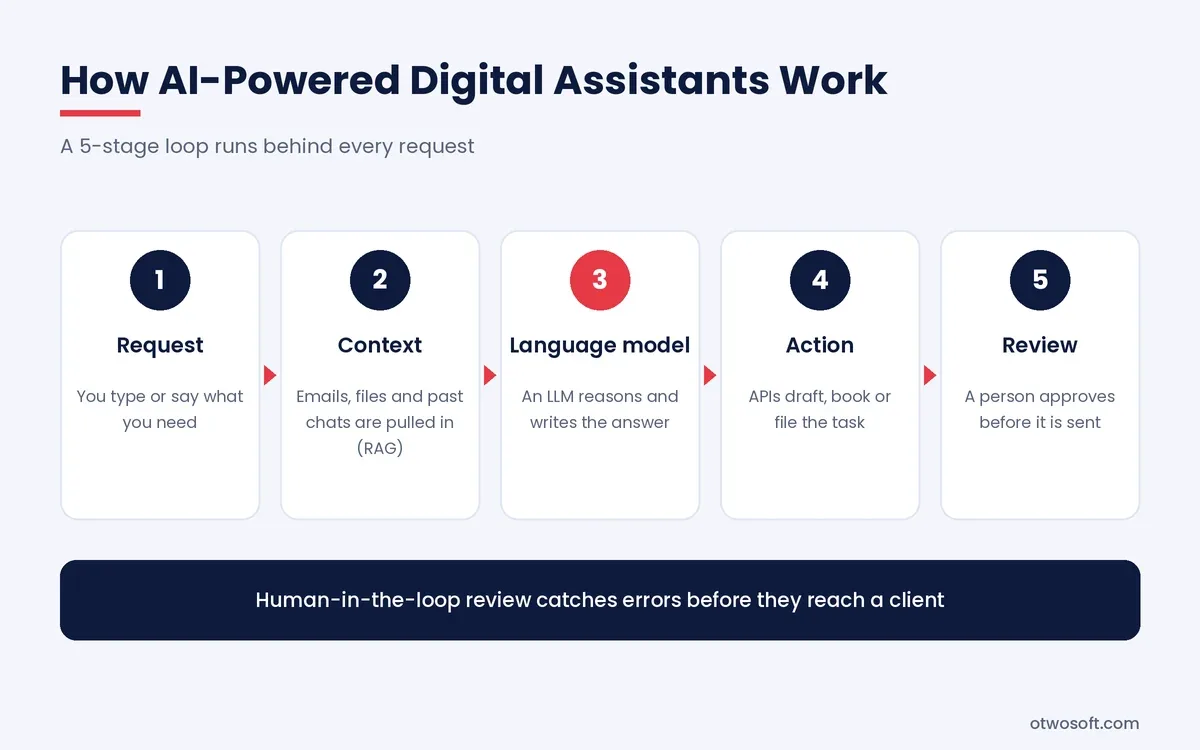
- Language model. An LLM from OpenAI, Anthropic, Google DeepMind or Meta interprets the request and writes the response, setting the ceiling for reasoning quality and writing style.
- Context layer. The assistant pulls relevant emails, documents or past chats into the request. Products such as Glean, Notion AI and Microsoft Copilot use retrieval-augmented generation (RAG), which searches a document store first and passes the best passages to the model.
- Integrations. Application programming interfaces (APIs) connect the assistant to email, calendars, task managers and cloud storage, so it reads real data instead of guessing.
- Action layer. The assistant writes a draft, books a meeting or files a task. Products that chain 2 or more actions together move into the territory of AI agent development.
- Interface and review. A chat window, sidebar or voice prompt shows the result for a person to approve. The human-in-the-loop step catches errors before they reach a client.
Memory ties the loop together, since context-aware AI remembers your writing tone, recurring projects and preferred meeting times. That stored context cuts the time spent on context reconstruction at the start of every request.
Prompt engineering still shapes the result, as a request that names the audience, format and deadline returns a more usable draft than a one-line instruction. Readers who want the model side explained can start with our explainers on generative AI and AI models.
What Can AI Assistants Do?
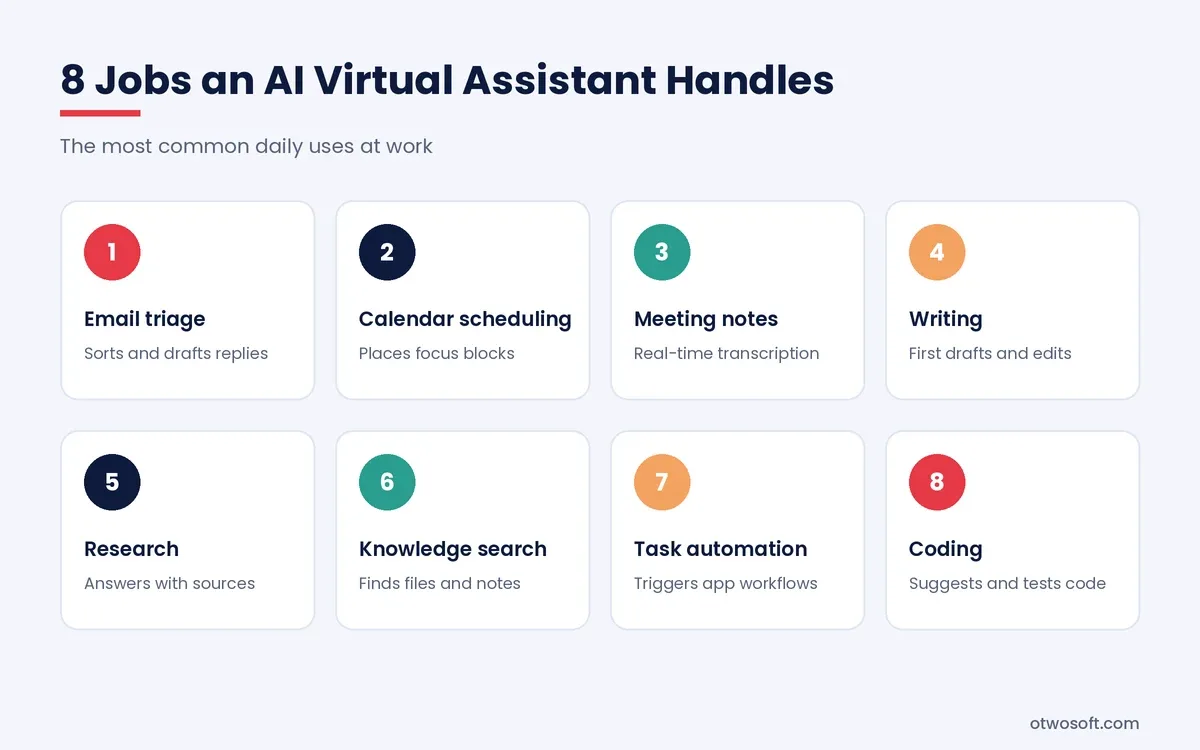
AI assistants handle 8 common work tasks: email triage, calendar scheduling, meeting notes, writing, research, knowledge search, task automation and coding. New users start with 1 or 2 of these jobs, then expand once the first habit sticks.
- Email triage. AI-powered email triage sorts an inbox by urgency, summarizes long threads and drafts replies in your voice. Gemini in Gmail and Microsoft Copilot in Outlook both offer thread summaries.
- Calendar scheduling. AI calendar scheduling tools such as Reclaim.ai and Motion place tasks and focus blocks around meetings, then reshuffle them when plans change.
- Meeting notes. AI meeting assistants such as Otter.ai and Fireflies.ai provide real-time transcription, followed by summaries that list owners and action items.
- Writing. General assistants draft proposals, reports and posts, while Grammarly and Jasper AI focus on editing or marketing copy.
- Research. Perplexity AI and the research modes in ChatGPT, Claude and Gemini search the web before returning answers with linked sources.
- Knowledge search. Glean, Sana Labs, Notion AI and Mem.ai search across company documents or personal notes, which supports personal knowledge management (PKM).
- Task automation. Workflow automation platforms such as Make (Integromat) pass data between apps, and an assistant can trigger those flows from a single chat request.
- Coding. GitHub Copilot and Claude suggest code, explain errors and write tests inside the editor.
Part of the value comes from small tasks. Each time an assistant files a task or answers "when is the next client call?", it removes a micro-decision that would otherwise break concentration. Shallow work automation of this kind leaves longer blocks for analysis and creative work that still needs a person. For non-AI apps such as task managers and time trackers, see our roundup of productivity tools.
Does AI Increase Productivity?
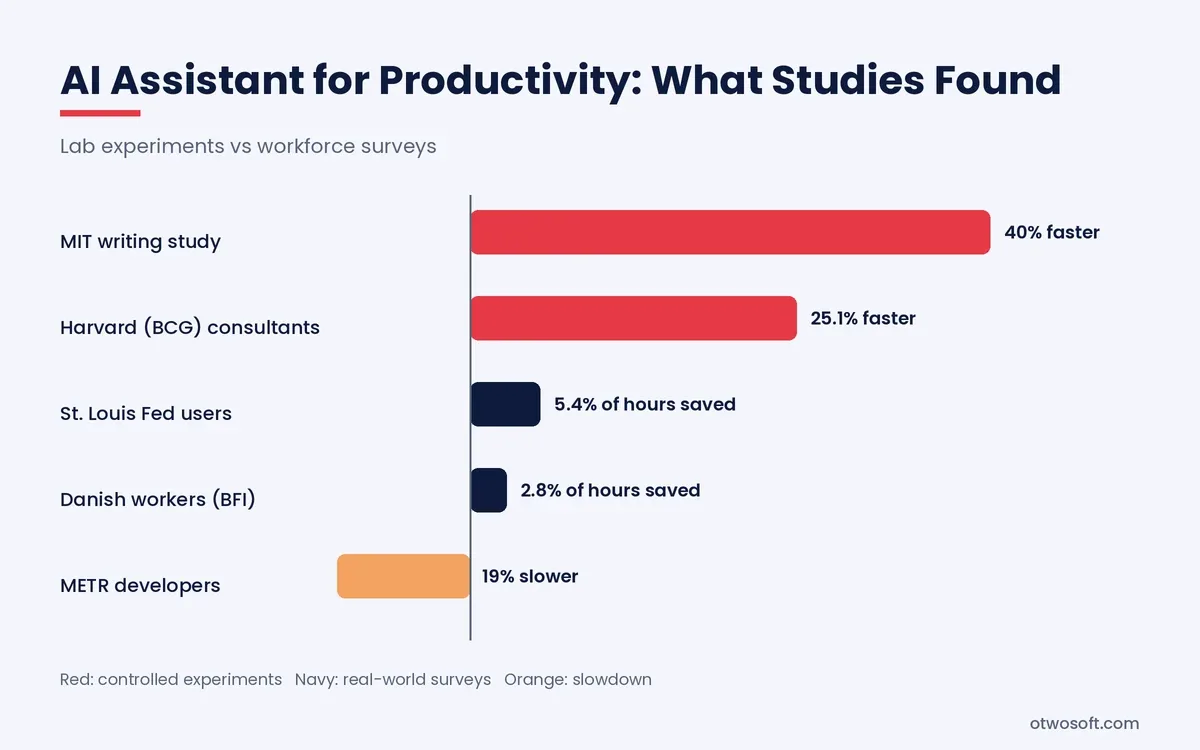
Yes, AI increases productivity on well-defined tasks such as writing, summarizing and first-draft analysis, though average time savings across whole workforces stay modest. Five studies and surveys show both sides of the picture.
- MIT writing experiment. Shakked Noy and Whitney Zhang gave 453 college-educated professionals writing tasks from their own occupations, with half allowed to use ChatGPT. The study, published in Science and summarized by MIT Economics, found the ChatGPT group finished 40% faster while graders rated their output 18% higher.
- Harvard field experiment. A Harvard Business School working paper studied 758 Boston Consulting Group consultants. On 18 tasks inside the model's abilities, consultants using GPT-4 completed 12.2% more tasks and worked 25.1% faster. The paper's abstract reports their quality as more than 40% higher than the control group's. On one task outside those abilities, the same consultants were 19 percentage points less likely to reach the correct answer.
- National survey. A nationally representative St. Louis Fed survey found that generative AI users saved 5.4% of their work hours in November 2024, about 2.2 hours in a 40-hour week. Across all workers, non-users included, the saving fell to 1.4% of total hours. The Fed's quarterly tracker on FRED put savings across all employed adults at 2.08% of work hours in Q3 2026.
- Danish labor market study. Anders Humlum and Emilie Vestergaard surveyed 25,000 workers in 11 occupations across Denmark. Their University of Chicago working paper for the Becker Friedman Institute reports average time savings of 2.8% of work hours, with no measurable effect on earnings or hours worked.
- Developer trial. In a randomized trial run by the nonprofit METR, 16 experienced open-source developers took 19% longer on 246 real tasks when they could use AI tools. The developers worked on mature projects they knew well, using early-2025 tools. The developers still believed the tools had made them about 20% faster. METR has since published follow-up work on late-2025 tools, so the 19% figure describes one setting, not every developer.
Why Lab Gains Shrink at Work
Lab gains shrink at work for 4 reasons: verification takes time, certain tasks sit beyond the model, saved minutes get absorbed, and people misjudge their own speed. Experiments hand participants clear instructions for tasks that need no company context, while real work rarely arrives that tidy.
- Verification time. Fact-checking, editing and debugging AI output eat into the minutes saved.
- The jagged frontier. Tasks that look equally hard can sit on opposite sides of what a model handles well, which is exactly what the Harvard consultants ran into.
- Absorbed time. Saved hours turn into extra email or meetings unless a team decides in advance where those hours go.
- Perception gaps. The METR developers felt faster while measuring slower, so self-reported savings need a stopwatch check.
The practical lesson is to pick tasks with clear inputs and easy-to-check outputs, then measure before and after. Teams that track a baseline, using the approach in our guide to KPI examples, see the real effect instead of the hoped-for one.
What Are the Main Types of AI Personal Assistants?
There are 7 main types of AI personal assistant: general chat assistants, suite copilots, meeting assistants, scheduling assistants, knowledge assistants, coding assistants and automation builders. A typical setup pairs 1 general assistant with 1 or 2 specialists from the wider group of AI productivity tools.
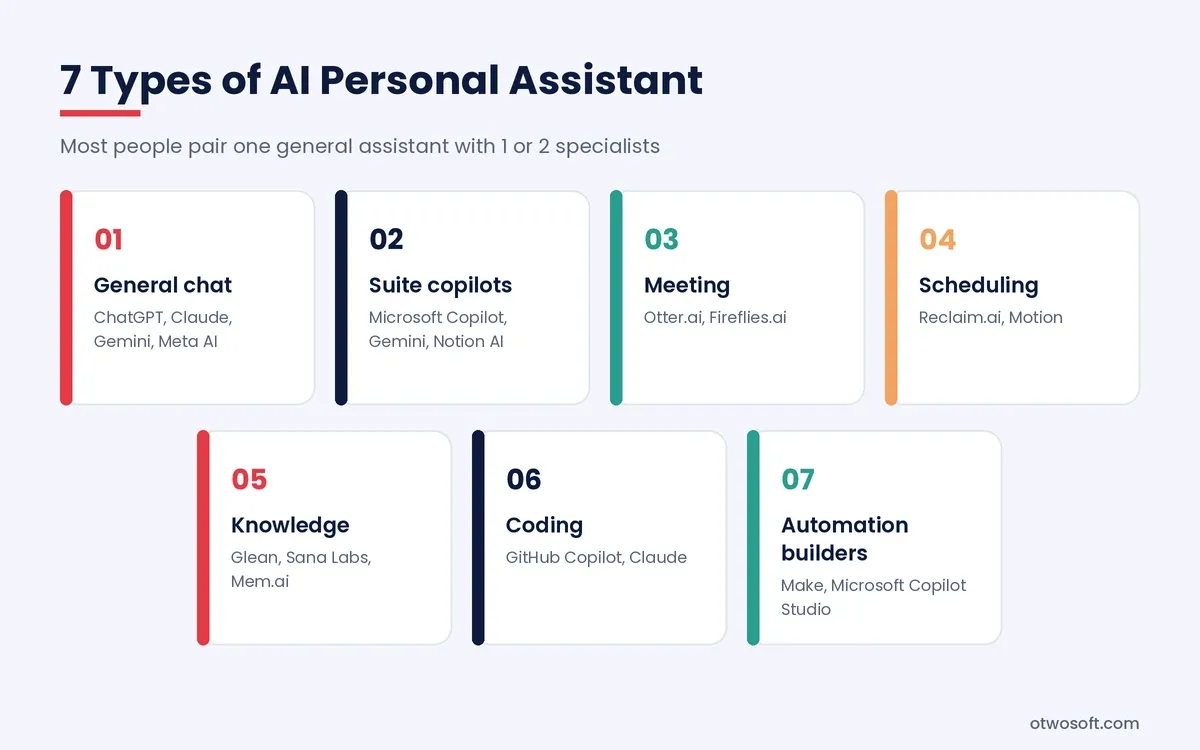
- General chat assistants answer questions, write and analyze data on almost any topic, with ChatGPT, Claude, Gemini and Meta AI leading this group.
- Suite copilots live inside office software and read your company files. Microsoft Copilot for Microsoft 365, Gemini for Google Workspace and Notion AI fit here, with Microsoft and Google marketing their versions as enterprise AI copilots.
- Meeting assistants record, transcribe and summarize calls, with Otter.ai and Fireflies.ai as 2 established choices.
- Scheduling assistants plan the day around meetings and deadlines, a job that Reclaim.ai and Motion are built for.
- Knowledge assistants search across documents, wikis and chat history, a group that includes Glean, Sana Labs and Mem.ai.
- Coding assistants write and review software inside the editor, where GitHub Copilot and Claude are well-known examples.
- Automation builders connect apps and run multi-step workflows without code. Make (Integromat) and Microsoft Copilot Studio are AI apps for building agents that trigger on events such as a new form entry or email.
Which AI Assistants Lead in 2026?
A strong 2026 setup pairs one general assistant, such as ChatGPT, Claude or Gemini, with the copilot inside the office suite you already pay for. The general assistant covers open-ended work, while the copilot reads company files under existing permissions. The table compares 13 tools by maker, main use and starting price.
| Assistant | Maker | Best for | Free plan | Paid plans from |
|---|---|---|---|---|
| ChatGPT | OpenAI | All-round writing, research and analysis | Yes | $8/month (Go), $20/month (Plus) |
| Claude | Anthropic | Long documents, careful writing and code | Yes | $20/month (Pro), or $17/month billed annually |
| Gemini | Google DeepMind | Gmail, Docs and Android users | Yes | $4.99/month (AI Plus), $19.99/month (AI Pro) |
| Microsoft 365 Copilot | Microsoft | Outlook, Teams and Excel users | Copilot Chat on eligible plans | $21/user/month (Business), plus a Microsoft 365 plan |
| Meta AI | Meta | Quick help inside WhatsApp and Instagram | Yes | Free for core use |
| Perplexity AI | Perplexity | Sourced web research | Yes | $20/month (Pro) |
| Notion AI | Notion | Teams that keep docs in Notion | Limited trial | Included in the Business plan |
| GitHub Copilot | GitHub (Microsoft) | Developers | Yes | $19/user/month (Business) |
| Otter.ai | Otter.ai | Meeting transcripts and live captions | Yes | Paid tiers vary |
| Fireflies.ai | Fireflies.ai | Meeting notes synced to a CRM | Yes | Paid tiers vary |
| Reclaim.ai | Reclaim.ai | Protecting focus time and habits | Yes | Paid tiers vary |
| Motion | Motion | Auto-scheduling tasks and projects | Trial only | Paid tiers vary |
| Glean | Glean | Company-wide knowledge search | No | Custom pricing |
How We Selected These Tools
We judged AI assistants for productivity on 5 criteria: the main job each tool does, its integrations, free plan access, published pricing and business controls. This comparison draws on vendor documentation and pricing pages checked in October 2026, not hands-on lab testing. Prices are US list prices, so confirm the current figure on the vendor's site before you buy.
- Main job. Each tool earns a place for one clear task, such as meetings, scheduling or research.
- Integrations. Tools that connect to email, calendars and office suites rank above standalone apps.
- Free plan. A free plan or trial lets a team test the tool before paying.
- Published pricing. Tools with public prices allow a fair cost comparison, while custom quotes get noted as such.
- Business controls. Admin settings, single sign-on (SSO) and data terms matter for company use.
Best General Assistants: ChatGPT, Claude and Gemini
ChatGPT works as an all-rounder with image generation, voice mode and deep research in one app. Claude suits long documents and careful writing, while Gemini fits people who already live in Google apps. All three handle drafting, summarizing, data analysis and web research on their free plans, with tighter usage limits.
ChatGPT, built by OpenAI in the San Francisco Bay Area AI ecosystem, offers Projects for grouping files and instructions by client. Claude, from Anthropic, reads long reports and contracts in a single pass, which suits policy, legal and research work. Gemini connects to Gmail, Drive and Calendar, so it answers questions about your own messages without any copying and pasting.
Each one has a clear limit: ChatGPT's Go plan can show ads, Claude Code needs a paid Claude plan, and Gemini's account features depend on a Google account. Microsoft 365 teams gain less from Gemini as a result.
Best Assistants Inside Your Office Suite: Microsoft Copilot, Gemini for Workspace and Notion AI
The right suite copilot is the one inside software your team already uses: Microsoft Copilot for Microsoft 365, Gemini for Google Workspace and Notion AI for Notion. These copilots read company email, files and calendars under existing permissions, which removes the separate setup a standalone tool needs.
Microsoft 365 Copilot is an AI-powered assistant that costs $21 per user per month for the Business version, on top of a qualifying Microsoft 365 business plan. The larger enterprise version lists at $30 per user per month, while Copilot Chat, a lighter version, comes with eligible plans at no extra cost. Microsoft does not sell Copilot as a standalone product, and full Notion AI sits in Notion's Business plan, with Free and Plus users limited to a trial.
Best AI Meeting Assistants: Otter.ai and Fireflies.ai
Otter.ai and Fireflies.ai are 2 established AI meeting assistants that join calls to transcribe, summarize and list action items. Otter.ai stands out for live captions and speaker labels, while Fireflies.ai leans toward pushing notes into CRMs and project tools. Both tools add a visible bot to the call, so tell attendees before it joins. Recording laws vary by state and country. California, Florida and Pennsylvania, for example, require consent from every party in many situations. Explicit consent from everyone on the call is the safest default.
Best Scheduling Assistants: Reclaim.ai and Motion
Reclaim.ai suits people who want to protect habits and focus time, while Motion suits people who want every task placed on the calendar automatically. Both tools rebuild the schedule when a meeting moves. Motion asks for more setup, since it needs a priority and a deadline on each task to plan the week well. Reclaim.ai works with Google Calendar and Outlook, while Motion offers a trial instead of a free plan.
Best for Research and Company Knowledge: Perplexity AI, Glean and Mem.ai
Perplexity AI is built for sourced web research, while Glean covers search across a company's internal apps. Perplexity cites a source for each claim, which makes fact-checking faster than with an uncited answer. Glean connects to tools such as Slack, Google Drive and Salesforce, then returns answers that respect each user's access rights. Mem.ai serves individuals who want a self-organizing personal notebook. Perplexity answers only as well as the sources it finds, so open each citation, while Glean sells on custom quotes to companies rather than individuals.
Best for Developers: GitHub Copilot and Claude
GitHub Copilot adds code completion inside editors such as VS Code and JetBrains IDEs, while Claude handles larger refactors and code explanations. GitHub Copilot Business costs $19 per user per month. METR itself expects larger gains for less experienced developers and smaller projects, so test any coding assistant on your own codebase before a team-wide rollout.
How Do You Choose the Right AI Assistant?
Choose an AI assistant by matching it to your biggest time drain, the apps that hold your data, your budget and the controls your company requires. The 5 steps below take about 2 weeks, including a short trial.
- Name the bottleneck. Write down the task that eats the most hours each week, such as inbox triage, meetings or research.
- Check your stack. Start with the assistant inside a productivity app you already open daily, such as Outlook, Gmail or Notion.
- Pick a generalist or specialist. A general assistant covers changing tasks, while a meeting or scheduling tool goes deeper on one job.
- Compare limits and price. Read the free plan caps, seat prices and any required base subscription before you commit.
- Test for 2 weeks. Use the tool on real work, then keep it only when the hours saved beat the cost.
AI Assistants by Role
Each role gets the most value from a different type of assistant, since the biggest time drain changes from job to job. The pairings below match common roles with the assistant types that fit their daily work.
- Founders and solo operators lean on a general assistant for drafting, research and investor updates.
- Sales teams use meeting assistants to log calls, then a suite copilot to draft follow-up emails.
- Support teams use knowledge assistants to find answers across help articles and past tickets.
- Operations teams use automation builders to move data between forms, spreadsheets and project tools.
- Recruiters and HR teams use scheduling assistants for interviews and general assistants for job descriptions.
- Developers use coding assistants inside the editor and a general assistant for documentation.
What Is the Best AI Assistant for iPhone?
The best AI assistant for iPhone depends on the job: Siri for hands-free phone control, ChatGPT or Claude for drafting work, and Gemini for people who use Google apps. iOS 27 arrived on September 14, 2026, with Siri AI as an English-only beta that adds on-screen awareness and personal context. French, Japanese, Korean, Portuguese and Spanish support is due in October, and the full feature set needs an iPhone 15 Pro or newer. Google and Apple announced a multi-year partnership in January 2026 under which Gemini models help run the next generation of Siri.
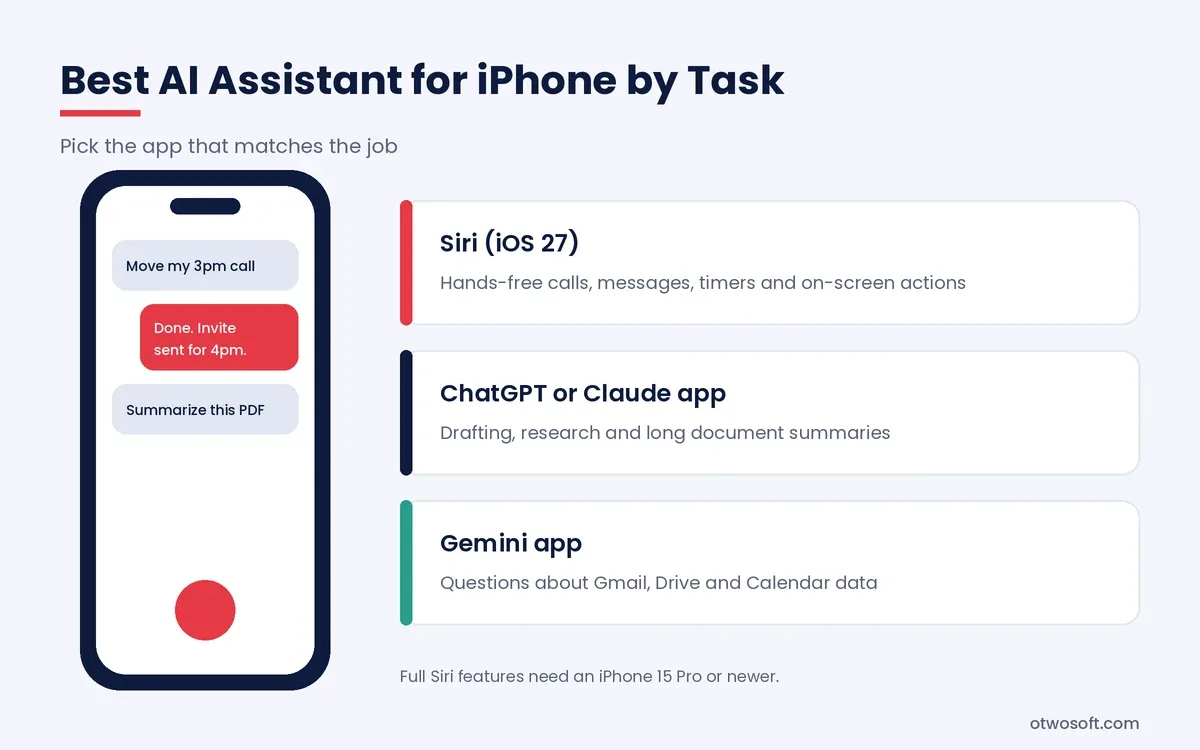
For work, the ChatGPT, Claude and Gemini apps offer voice mode, file uploads and sync with their desktop versions. A practical setup keeps Siri for timers, messages and quick device actions, then uses one of those apps as the best personal assistant AI for drafting or research.
Check privacy settings before connecting mail or files. Each of these apps has a setting that controls whether your chats help train future models, and that setting is worth reviewing on day one.
How to Roll Out an AI Personal Assistant for Business
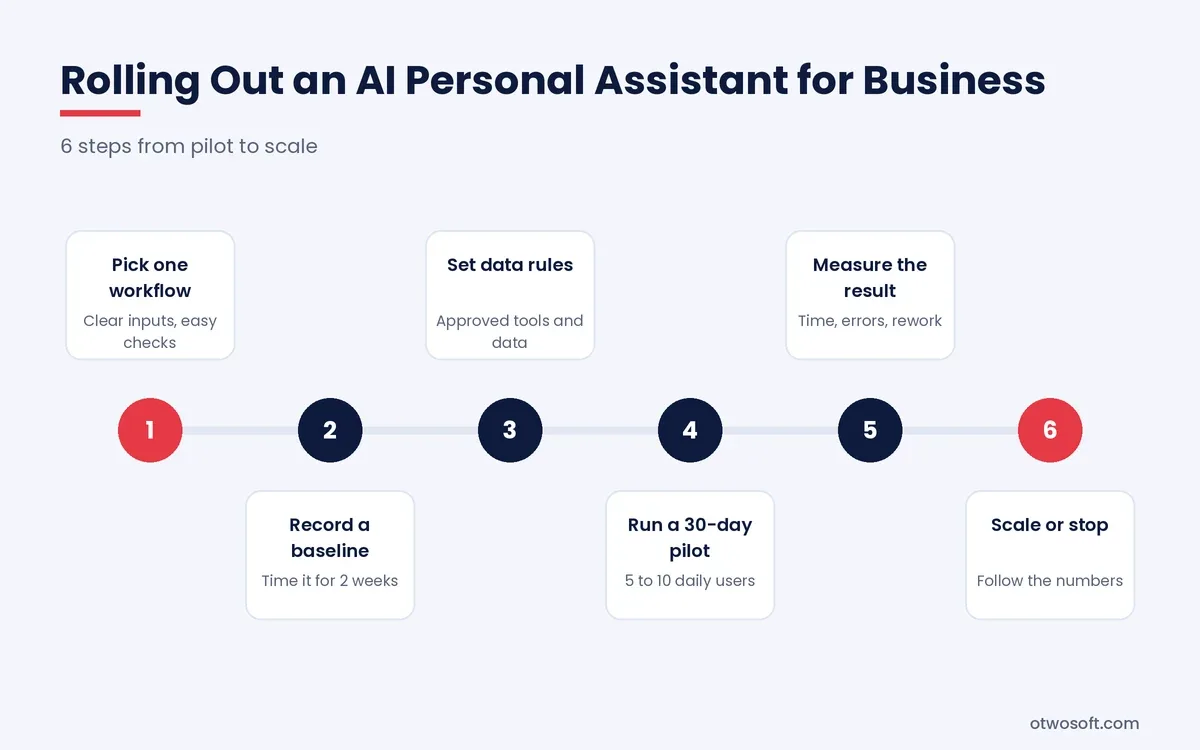
To roll out an AI personal assistant for business, start with one measurable workflow, set data rules, run a 30-day pilot, then expand only what the numbers support. The 6 steps below work for a 10-person agency or a 500-person company.
- Pick one workflow. Choose a task with clear inputs and easy-to-check output, such as meeting summaries or first-draft client emails.
- Record a baseline. Time the task for 2 weeks before the assistant arrives, so later gains rest on data instead of impressions.
- Set data rules. Decide which client, financial and personal data may enter the tool, then pick a business plan with admin controls.
- Run a 30-day pilot. Give access to 5 to 10 people who do the task daily, and collect examples of good and bad output.
- Measure the result. Compare time per task, error rate and rework against the baseline.
- Scale or stop. Expand the assistant to the next team when the numbers hold, or drop it if they don't.
For example, a 12-person marketing agency could pilot an assistant that summarizes client calls, creates tasks in its project tool and drafts follow-up emails. An account manager approves each email before it goes out, and the agency compares turnaround time against its 2-week baseline.
AI Governance and Data Privacy Rules
Every business rollout needs 4 written rules: approved tools, banned data types, mandatory human review points and a named owner for each integration. The Generative AI Profile from the National Institute of Standards and Technology (NIST), published in July 2024, lists 12 risks tied to generative AI. Data privacy, information security and confabulation are among them. The profile pairs those risks with more than 200 suggested actions that a company can adapt into its own policy.
OpenAI, Anthropic, Google and Microsoft state in their business terms that business-plan data stays out of model training by default. Retention periods, human review rules and data residency still differ by vendor and product. Read each data processing agreement, then confirm admin controls and SSO before staff connect inboxes or shared drives.
How Do You Measure AI Assistant Productivity?
You measure AI assistant productivity with 5 numbers: hours saved per user, cycle time per task, rework rate, adoption rate and cost per hour saved. AI productivity benchmarking works best when each number has a baseline recorded before the rollout.
- Hours saved per user each week, taken from timed samples instead of surveys alone.
- Cycle time from request to finished output, such as the turnaround on a client proposal.
- Rework rate, meaning the share of AI drafts that need heavy editing or fail review.
- Adoption rate, measured as weekly active users divided by licensed seats.
- Cost per hour saved, calculated as the monthly seat cost divided by monthly hours saved.
An AI assistant for productivity pays off fastest when adoption stays high. A $21 monthly seat that saves the St. Louis Fed average of 2.2 hours a week, roughly 9.5 hours a month, costs about $2.20 per hour saved. That figure covers the add-on only, without the base Microsoft 365 plan, and it rests on self-reported average savings. The same seat left unused costs $21 for nothing, which is why adoption deserves as much attention as price.
When Should You Build a Custom AI Assistant?
Build a custom AI assistant when off-the-shelf tools can't reach your internal systems, can't follow your approval rules or can't keep sensitive data inside your own infrastructure. Buying stays the better choice for standard tasks such as email drafting or meeting notes. A custom build makes sense when at least 1 of these 5 conditions holds:
- Missing integrations. The tools you need to connect have no supported connector.
- Unusual approvals. Your sign-off chain is too specific for a vendor's settings.
- Data residency. Regulations require data to stay in a set country or on your own servers.
- Custom access rules. Different staff groups need different views of the same records.
- A measurable business case. The expected hours saved cover build and maintenance costs.
A custom assistant combines an LLM, a retrieval pipeline over company documents and connectors to the tools staff already use. O2SOFT builds these systems through its AI development services. Models and vector stores come from our technology stack, chosen per project against cost, data residency and what your team can maintain.
The interface decides whether people keep using the tool. UI/UX design keeps the review step quick, while a web development company or mobile app development company puts the assistant where staff already work. The EyeCast case study reports a 73% lift in user activation after AI-driven onboarding, a first-party figure without published baseline data.
What Comes Next for AI Assistants?
The next gen AI assistant is moving from single replies to multi-step work across 2 or more apps, and 3 shifts already ship in 2026 products. The first is already standard, while the other two are still spreading.
- Agents inside assistants. ChatGPT, Claude and Gemini now run longer tasks, such as research reports or file edits, that take minutes instead of seconds.
- Multi-agent systems. Specialized agents split one job, with one gathering data, another drafting and a third checking the output, while AI orchestration tools coordinate the handoffs.
- Proactive help. Assistants increasingly flag a calendar conflict or prepare a meeting brief before you ask, which takes some of the mental load of the workday off the person.
These gains still depend on the same discipline of clear tasks, firm data rules and a person who checks the output. Our explainers on machine learning, training data and the types of AI cover the technology underneath.
Conclusion
AI assistants for productivity save real time when they handle clear, checkable work such as email triage, meeting notes, drafting and research. Every product rests on the same 5 parts of language model, context, integrations, actions and review, so the right choice depends on which apps already hold your data.
The research supports a measured view of these tools. Controlled experiments show gains of 25% to 40% on suitable tasks, while workforce surveys put average savings between 1.4% and 5.4% of work hours. Start with one workflow, record a baseline and set data rules, then let the numbers decide how far the assistant goes.
Frequently Asked Questions
Are AI assistants worth paying for?
Yes, a paid AI assistant is worth it for daily users, since ChatGPT Plus, Claude Pro, Gemini AI Pro and Perplexity Pro each cost $20 a month or less. Occasional users can stay on free plans, which cap daily messages.
Can an AI virtual assistant replace a human assistant?
No, an AI virtual assistant does not replace a human assistant for judgment-heavy work such as negotiating, handling sensitive clients or managing relationships. An AI-powered virtual assistant handles drafting, scheduling and summarizing well, so a team can pair one human assistant with AI tools instead of hiring a second person.
Is ChatGPT an AI personal assistant?
Yes, ChatGPT works as an AI personal assistant for writing, research, planning and analysis, though it needs connected apps to act on your email or calendar. OpenAI offers a free plan, with Go at $8 a month and Plus at $20 a month in the US.
What is the best artificial intelligence personal assistant for small businesses?
The best artificial intelligence personal assistant for a typical small business is the copilot inside their existing office suite, such as Microsoft 365 Copilot or Gemini for Google Workspace. These tools read company files under existing permissions, which keeps setup short. A business that runs on Slack, Salesforce or a custom stack gets more from an assistant built around those tools instead.
Are AI assistants safe for company data?
Yes, AI assistants can be safe for company data when the business plan includes admin controls, SSO, a data processing agreement and limits on model training. Retention and residency terms differ by vendor, so check them before rollout and keep client records out of personal accounts.
How much time does an AI-powered personal assistant save?
An AI-powered personal assistant saves its users about 2.2 hours in a 40-hour week on average, based on the St. Louis Fed's November 2024 survey. Savings run higher in information services and lower in jobs with little computer work.
What is the best AI personal assistant for free?
The best free AI personal assistants are ChatGPT, Claude, Gemini and Meta AI, all of which offer free plans with daily usage limits. Meta AI works inside WhatsApp and Instagram for quick questions, while the other three handle longer documents and deeper research.