


An enterprise knowledge base building methodology for AI agents is a repeatable process for turning scattered company knowledge into a governed source that agents query when they answer. Company knowledge here means documents, data definitions, and workflow rules, each of which needs an owner before any agent reads it. The method runs in five stages: map the knowledge agents need, ingest it, build hybrid retrieval, add a governed semantic layer, then evaluate before launch.
Teams that follow the method get answers grounded in current, approved content instead of whatever the model memorized during training. Grounding cuts confabulation, the term the NIST AI 600-1 profile uses for confidently stated false output. Security teams gain permission checks at query time, while product owners gain a test suite that shows whether each change helped or hurt.
The main uses include a support agent answering policy questions, a data analyst agent pulling certified metric definitions, and a legal agent checking contract clauses. Internal assistants for HR or IT requests run on the same foundation. Demand is already here, with the Stanford AI Index 2026 reporting that 88% of surveyed organizations used AI in 2025.
A production setup has seven working parts: an ingestion pipeline, a vector database, a keyword index, a reranker, a semantic layer, an evaluation set, and freshness monitoring. The sections below work as a practical guide to building agents on top of that foundation. Readers getting started with AI agents will find the agent basics first, followed by prerequisites, the five build steps, orchestration, guardrails, and scaling.
Key Takeaways
- Vector search alone misses document versions and exact terms.
- Map six knowledge types before writing ingestion code.
- Tag every chunk with owner, date, and access metadata.
- Combine BM25 with dense retrieval, then rerank top results.
- Serve business definitions from governed, versioned records.
- Feed wrong answers back into the evaluation set after launch.
- Build a ground truth set before any agent goes live.
- Enforce permissions at the source, storage, and retrieval layers.
What Is a Knowledge Base for AI Agents?
A knowledge base for AI agents is a governed, queryable store of company knowledge that an agent retrieves from at inference time to ground its answers and actions. Employees rarely browse it directly, since the agent does the searching, ranks the results, and passes the best passages to the language model as context.
A traditional company knowledge base in a wiki serves people who type a keyword, skim a list of articles, and decide which one applies. An AI knowledge base serves software instead, so every passage needs clean structure, metadata, and a named owner before the agent can judge whether the text is current.
The retrieval step follows the retrieval-augmented generation (RAG) pattern described by Lewis and colleagues at NeurIPS 2020. In that pattern, a model reads from an external index rather than relying only on its parameters. Knowledge in the index can change every day, whereas knowledge learned from training data stays fixed until the model gets retrained.
The architecture connects six layers in a fixed order. Source systems feed an ingestion pipeline, the pipeline writes to a vector index plus a keyword index, and a retrieval service queries both. A semantic layer answers definition lookups on a separate path, while the agent sits on top and calls each service as a tool. Permission checks wrap every layer, so a document blocked at the source never becomes retrievable further down.
The Six Knowledge Types a Production Agent Knowledge Base Must Cover
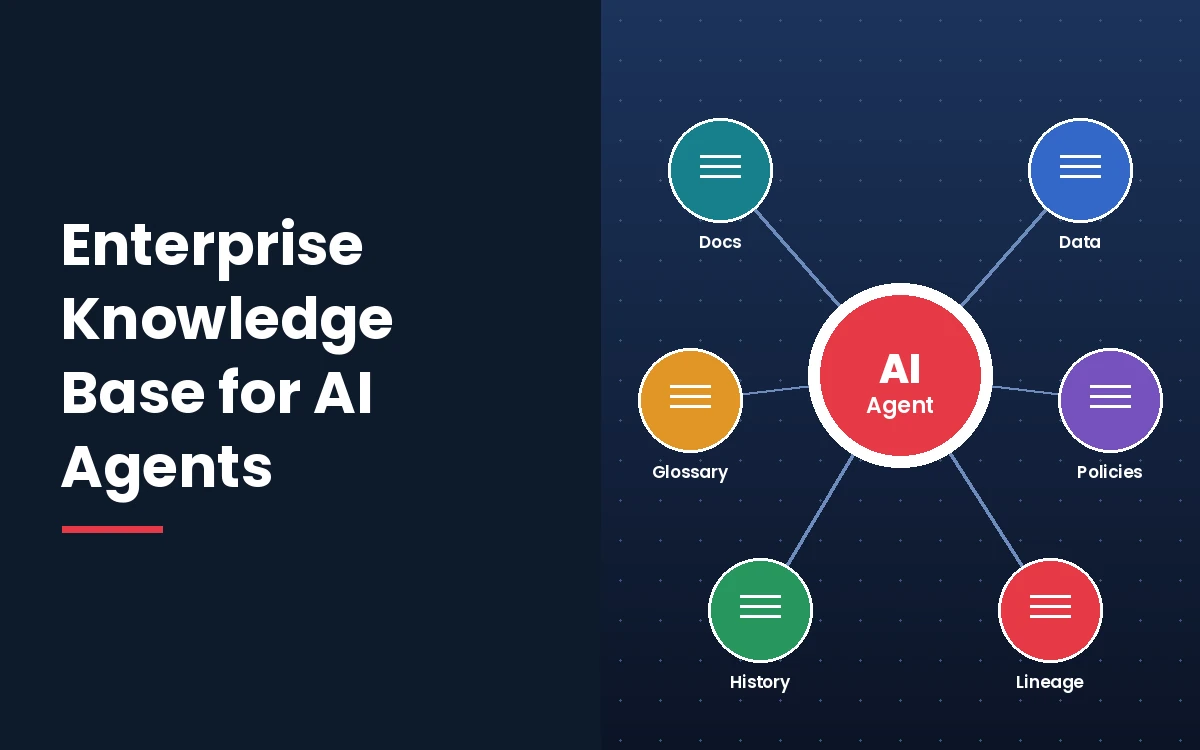
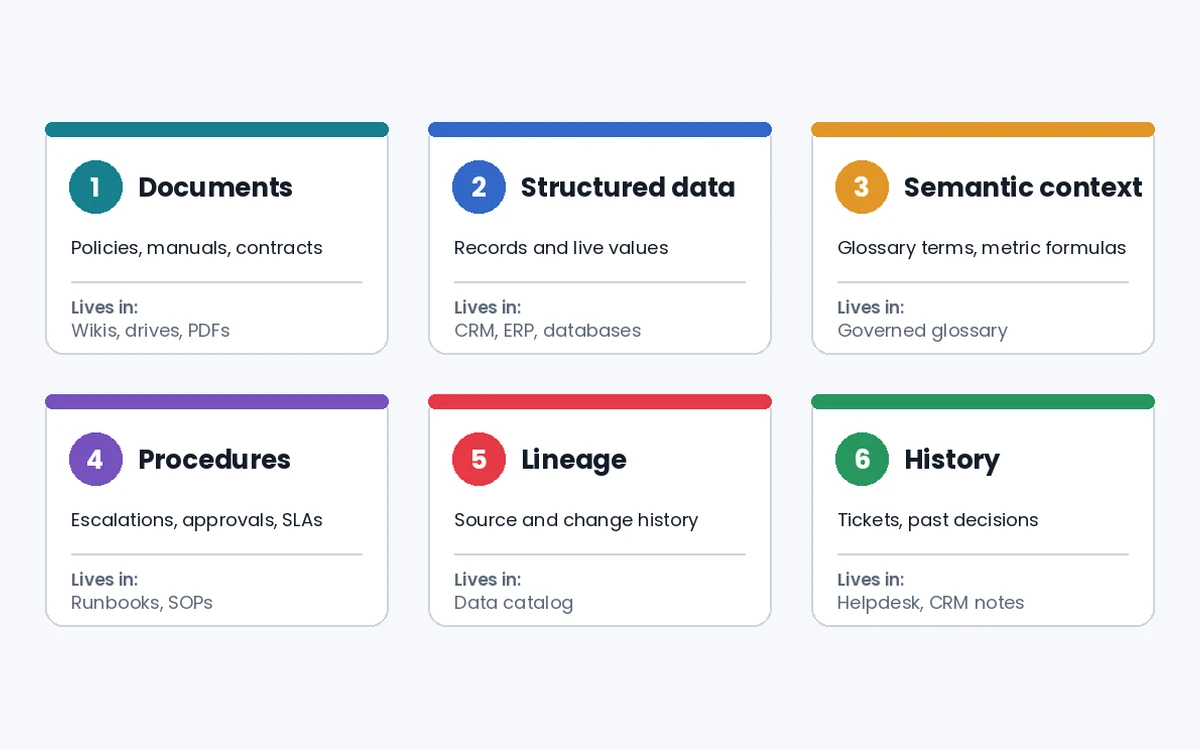
A production agent knowledge base covers six knowledge types: documents, structured data, semantic definitions, procedures, lineage, and history. Each type lives in a different system and calls for a different retrieval method.
- Document knowledge includes policies, manuals, contracts, and help articles stored as unstructured text.
- Structured data covers records in databases, CRMs, and ERP systems that agents query live through APIs.
- Semantic context holds business glossary terms and metric formulas, such as the way finance defines an active customer.
- Procedural knowledge sets escalation paths, approval chains, and service-level thresholds that tell an agent what to do next.
- Lineage and provenance record where each fact came from, who changed it, and which reports depend on it.
- Historical memory keeps resolved tickets, past decisions, and earlier conversations so similar cases get similar answers.
Real systems combine these types instead of picking one. A single question about parental leave can pull a policy chunk, an employee record, and a state-level rule within the same request.
What Is an Agent?
An agent is a system that uses a language model to run a multi-step workflow on a user's behalf, choosing its tools and deciding when the task is finished. A chatbot answering one question from a fixed prompt does not qualify, nor does a sentiment classifier that labels text without acting on it.
Anyone learning how to build an AI agent needs two traits clear from the start. The agent picks from a set of tools, some to gather context and others to change records, inside guardrails its builders define. Control of the workflow varies by design, from a model that plans every step to deterministic orchestration where fixed code sets the sequence and the model fills in judgment calls. Many production systems mix both, adding human approval before any irreversible action.
Every one of those choices depends on retrieved context, so the knowledge base sets the ceiling on how far anyone can trust the agent. Readers new to the underlying technology can start with how AI works or our explainer on generative AI.
When Should You Build an Agent?
Build an agent when a workflow needs judgment, depends on brittle rules, or runs on unstructured content that ordinary code handles poorly. Fixed tasks with clear rules stay cheaper and safer as conventional automation.
- Judgment-heavy decisions, such as refund approvals with exceptions or claims that need facts from several documents.
- Brittle rule sets, such as vendor security reviews whose conditions grow with every audit.
- Unstructured inputs, such as emails, PDFs, and chat transcripts that need reading before any action happens.
Teams weighing how to create an AI agent for a specific process can test the fit against our list of appropriate generative AI tasks before committing a budget. Each of these cases relies on company knowledge the base model never saw, so the knowledge base gets designed alongside the agent from day one.
Agent Design Foundations
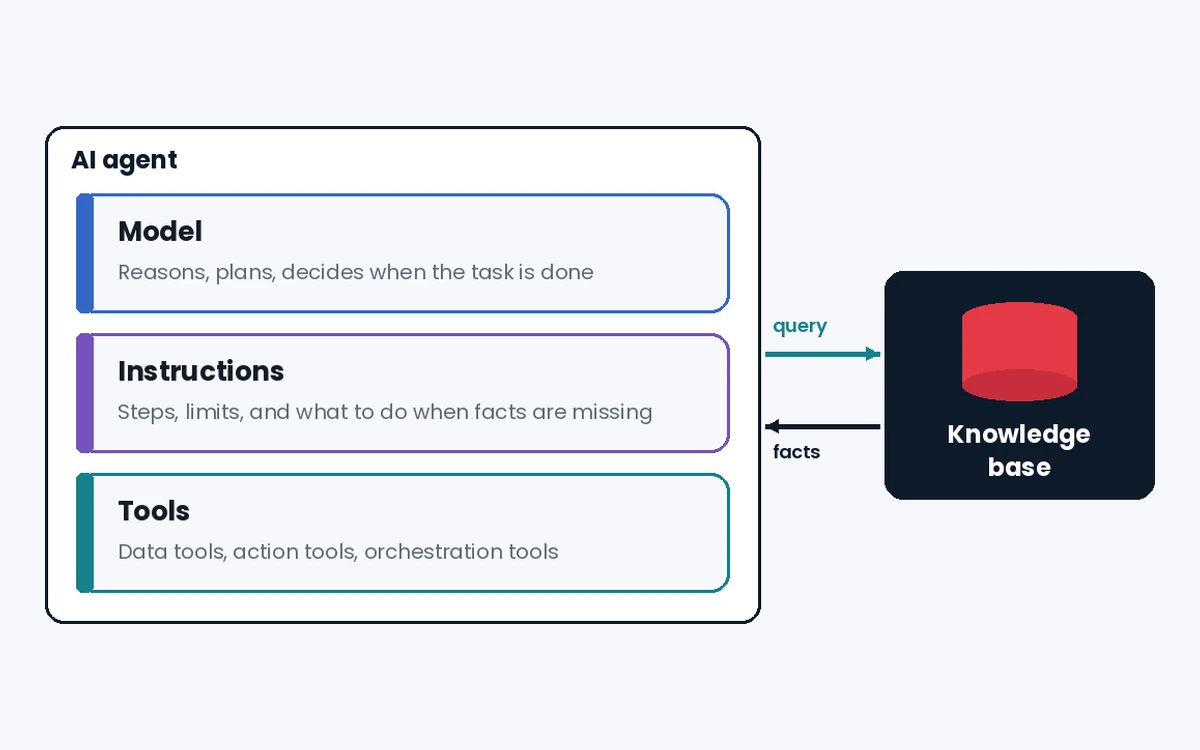
Every agent has three parts: a model that reasons, tools that act, and instructions that set behavior and limits. The knowledge base connects through the tools layer, usually as a retrieval tool the model calls whenever it needs facts.
A minimal definition in Python shows how the three parts fit together, whichever framework your team prefers:
support_agent = Agent(
    name="Policy support agent",
    instructions="Answer only from retrieved policy text. Cite the source document.",
    tools=[search_knowledge_base, lookup_customer, create_ticket],
)
Selecting Your Models
Pick the model by task: prototype with the most capable model to set a quality baseline, then swap in smaller models wherever evaluation scores hold. Intent classification and query rewriting run well on small, fast models, while refund decisions or multi-document synthesis justify a larger one. Our guide to the AI model covers size, cost, and latency trade-offs in more depth.
Defining Tools
Agents use three tool types: data tools that read context, action tools that change systems, and orchestration tools that hand work to other agents.
- Data tools query the knowledge base, a CRM, or a document store.
- Action tools send an email, update a record, or open a ticket.
- Orchestration tools call a specialist agent, such as a refund agent or a research agent.
Give each tool a standard definition with typed inputs, a plain description, and its own tests, so several agents can reuse one copy without versions drifting apart. The Model Context Protocol (MCP) offers one shared way to expose tools and knowledge sources to any compatible agent. Stewardship of the protocol moved to the Linux Foundation's Agentic AI Foundation in December 2025, which keeps it vendor-neutral.
Configuring Instructions
Write instructions from existing operating procedures, break them into numbered steps, and define what the agent does when information is missing.
- Start from the support scripts and policy documents your team already follows.
- Split long procedures into short, ordered steps with one action each.
- Name the exact tool or output each step expects.
- Spell out edge cases, such as a missing order number or a request outside policy.
- Tell the agent to answer only from retrieved text and to say so when nothing relevant came back.
Prerequisites
Five prerequisites come before any ingestion code: representative queries, a source inventory, a vector database choice, a chunking and embedding decision, and a business glossary with owners.
- A defined agent use case with real questions pulled from tickets, search logs, or chat history, which later become the evaluation baseline. Around 50 to 100 questions make a sensible starting set for one use case.
- An inventory of knowledge sources mapped to the six types, listing the owner, format, update frequency, and access tier of each one.
- A vector database chosen for hybrid search and permission filtering. Pinecone, Weaviate, Milvus, and the pgvector extension for PostgreSQL differ on both points, so settle the choice before writing ingestion code.
- A chunking and embedding strategy fixed in advance, since changing chunk size or the embedding model later means re-ingesting the whole corpus. The MTEB benchmark compares embedding models across 8 task types and 58 datasets, which helps narrow a shortlist.
- A business glossary baseline with named owners and version history, kept in a governed system rather than a shared spreadsheet.
A source readiness assessment ties these prerequisites together before any embedding starts. Sample each source and score it on four questions. Check how much content duplicates another source, how much has passed its review date, which fields are missing, and whether current permissions match the intended audience. Sources that fail the check go back to their owners for cleanup, since embedding bad content only makes it easier to retrieve.
Why Most AI Agent Knowledge Bases Fail in Production
Most AI agent knowledge bases fail by relying on vector similarity alone, which cannot tell a current document from a retired one or a defined term from a loosely related phrase. The demo path is short: load documents into a vector store, embed them, then connect retrieval to the agent. Production adds conflicting versions, permission rules, and questions spanning several knowledge types at once.
What Is the Gap Between a Demo Knowledge Base and a Production One?
The gap comes down to three conditions demos avoid: uneven document quality, approximate retrieval, and business context buried in chat threads and email.
A compliance agent answering anti-money laundering (AML) questions can index both the current policy PDF and a two-year-old Confluence summary of the previous rules. Both passages score close on embedding similarity, and a plain vector store has no field marking the older one as retired.
Retrieval stays approximate even with clean documents. Dense vectors find passages whose meaning sits close to the query, which handles paraphrased questions well but stumbles on product codes, policy numbers, and acronyms that need an exact match.
Business context forms the third gap. Decisions about what a term means often live in Slack threads, email, and meeting notes inside the team collaboration tools people use daily, where no owner or version history exists.
Why Does Semantic Retrieval Alone Produce Incorrect Answers?
Semantic retrieval returns text similar to the question, and similar text can still be outdated, written for another region, or off-limits to the person asking. AI agent hallucination at the retrieval layer looks exactly like this, with the model faithfully repeating a passage that should never have reached it.
Context order adds a second problem. Liu and colleagues found that language models use information at the start or end of a long context far better than information placed in the middle. Stuffing 30 loosely relevant chunks into a prompt therefore lowers accuracy instead of raising it. The five steps of the enterprise knowledge base building methodology for AI agents below address each failure in turn.
Step 1: Map the Six Knowledge Types Your Agents Need
Start by listing every query type an agent will handle, then tag the knowledge types each one needs. A data analyst agent leans on structured data and semantic context. A support agent leans on documents and procedures, while a legal agent needs documents plus lineage to prove where a clause came from.
For each query type, record four facts: the knowledge type, the source system, the latency the answer needs, and the owner of the authoritative version. The records then become the specification for the ingestion pipeline in Step 2.
Semantic context is a frequent blind spot. Business definitions and metric formulas need governed storage instead of similarity search. Multi-agent memory silos make the gap worse, since each agent keeps its own version of what a term means.
Validation checklist for Step 1:
- Every query type maps to at least one knowledge type.
- Every source has a named owner and an authoritative version.
- Semantic definitions sit on a separate list from unstructured documents.
- Access requirements are written down for each knowledge type.
Step 2: Design Your Document Ingestion Pipeline
A document ingestion pipeline turns raw source files into retrievable chunks through four stages: extraction, cleaning, chunking, and enrichment. Clean ingestion is what turns a pile of files into a content knowledge base AI agents can trust.
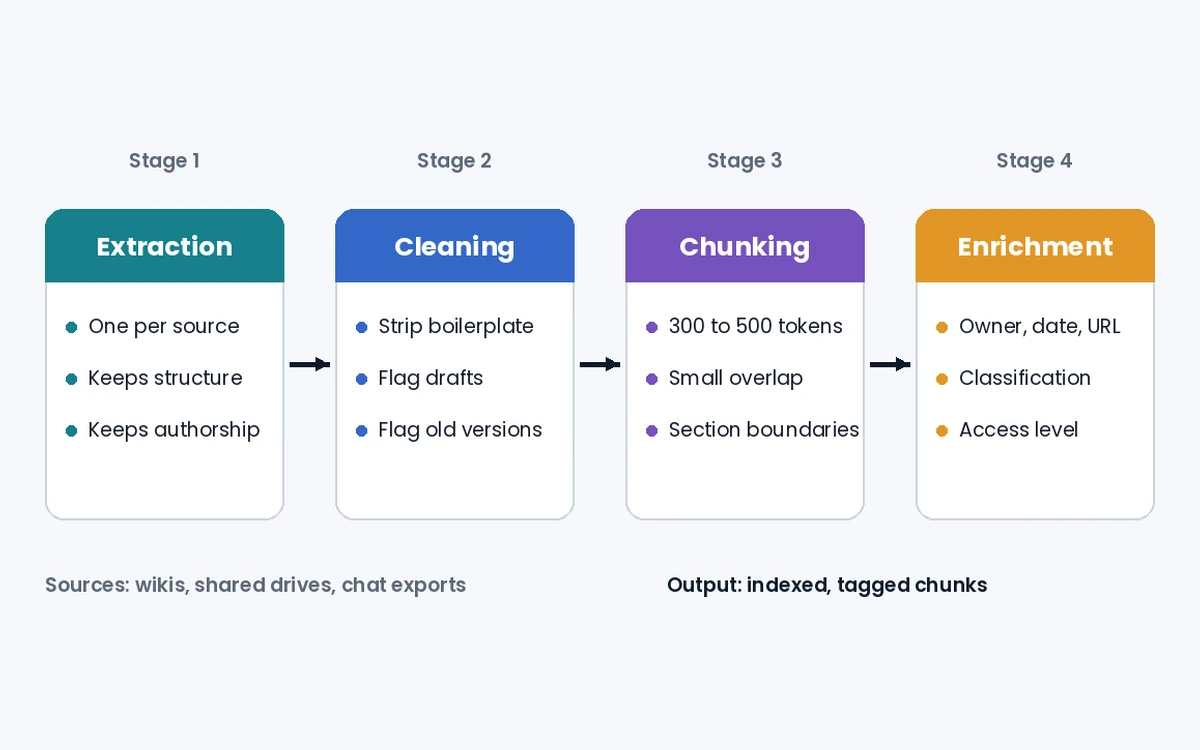
- Extraction pulls content from Confluence, Notion, SharePoint, Google Drive, and Slack exports with a dedicated extractor per source. Generic parsers drop the page hierarchy, labels, and authorship each platform stores next to the text.
- Cleaning strips navigation, headers, and formatting debris, then flags drafts, duplicates, and documents that conflict with a newer version. Flagging before indexing costs far less than tracing a wrong answer back to its source later.
- Chunking splits documents into retrieval units sized to the query pattern. A range of 300 to 500 tokens with a small overlap works as a starting experiment for reference material, while policies keep their section boundaries through semantic chunking. The right size depends on document structure, query type, and the embedding model, so the evaluation set from Step 5 decides the final setting.
- Enrichment attaches metadata to every chunk, including the source URL, title, owner, last modified date, classification, and access level. The fields make filtered retrieval, freshness checks, and permission filtering possible at query time.
An enriched chunk stored in the index looks like this:
{
  "chunk_id": "travel_policy_2026_s4_p2",
  "content": "Economy class applies to flights under six hours...",
  "source_url": "sharepoint/hr/travel-policy-2026",
  "document_title": "Travel and Expense Policy 2026",
  "owner": "finance_team",
  "last_modified": "2026-08-12",
  "status": "current",
  "access_level": "all_employees",
  "review_after_days": 90
}
Validation checklist for Step 2:
- Each source system has an extractor that keeps its structural metadata.
- Cleaned chunks carry no navigation text or formatting artifacts.
- Each chunk holds enough metadata for filtered retrieval.
- Outdated and conflicting versions get flagged before indexing.
Step 3: Build Your Retrieval Layer
Production retrieval needs four parts: a dense vector index, a sparse keyword index, a reranker, and metadata filters for permissions.
Vector indexing converts each enriched chunk into an embedding, a list of numbers that places similar meanings close together. Embedding models are neural networks trained to map text into that space. Many vector databases search those embeddings with graph indexes such as HNSW, which trade a small amount of recall for much faster approximate nearest-neighbor search. Actual latency depends on corpus size, hardware, and index settings, so benchmark it on your own data.
Hybrid search runs dense vector retrieval alongside sparse keyword retrieval, such as BM25 or SPLADE, then merges both result lists. Reciprocal Rank Fusion (RRF), introduced by Cormack, Clarke, and Buettcher at SIGIR 2009, scores each document by summing 1/(k + rank) across the lists. The original paper used k = 60 in its experiments, which makes a reasonable starting value. Test other values against representative queries before settling on one.
| Method | Matches on | Strong at | Weak at |
|---|---|---|---|
| Dense vector retrieval | Meaning | Paraphrased questions | Codes, IDs, rare terms |
| BM25 keyword retrieval | Exact terms | Policy numbers, acronyms | Synonyms, rephrasing |
| Hybrid search with RRF | Meaning and terms | Mixed enterprise queries | One more index to maintain |
| Cross-encoder reranking | Query and passage together | Final precision | Too slow for the full corpus |
Reranking passes the top-K candidates through a cross-encoder that reads the query and each passage together. The cross-encoder judges relevance more precisely than first-stage retrieval, so the agent receives only the strongest few passages. Candidate and final counts depend on the workload, with latency budgets and passage length setting the limits.
Permission filters at retrieval time use the requester's identity and role, so a contractor never receives a chunk tagged for the finance team. Retrieval filters add to source permissions and storage encryption without replacing them, especially for employee, financial, or legal records. Some questions need relationships rather than passages, such as which policies apply to an employee in a given state. A knowledge graph stores entities and links as nodes and edges for that kind of multi-hop lookup, working next to the vector index. Our comparison of symbolic AI explains the logic-based tradition behind graph reasoning.
Store choice follows the question type. A vector database suits open-ended questions over long documents, while a relational database answers exact lookups such as an order status or a leave balance. A knowledge graph earns its build cost only when answers depend on chains of relationships. Many enterprise setups start with a vector index plus relational sources, then add a graph later.
Validation checklist for Step 3:
- Hybrid search returns results from both dense and keyword retrieval.
- RRF scores beat single-method retrieval on your ground truth set.
- Reranked precision@5 exceeds first-stage precision@5.
- Permission filters apply at retrieval time, on top of source and storage controls.
Step 4: Add a Governed Semantic Layer for Business Context
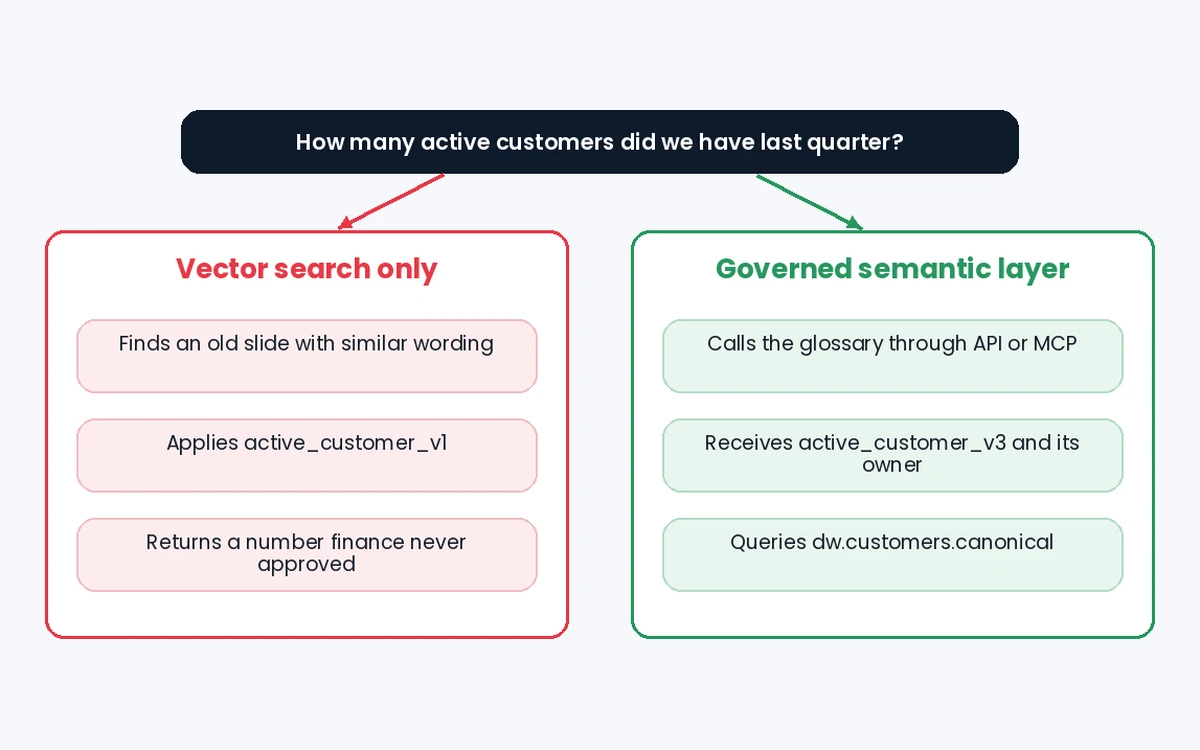
A governed semantic layer stores business definitions as versioned records with owners, so agents look up the exact meaning of a term instead of guessing from similar text. Vector search can still find documents that discuss active customer. The agent should not treat the nearest match as the definition, so it fetches one certified answer through an API or an MCP server before applying the term.
Documents carry knowledge context, such as policies and past decisions. The semantic layer carries meaning with database-record precision, and its link to data lineage pushes each definition change to every agent that depends on it. A governed definition looks like this:
{
  "term_id": "active_customer_v3",
  "definition": "Account with at least one paid order in the last 90 days, excluding test and internal accounts",
  "owner": "finance_team",
  "approved_on": "2026-06-30",
  "source_table": "dw.customers.canonical",
  "refresh": "daily",
  "supersedes": ["active_customer_v1", "active_customer_v2"],
  "readable_by": ["analyst_agent", "support_agent"]
}
A hypothetical data analyst agent asked for last quarter's active customer count shows the difference. With vector search alone, the agent can retrieve an old slide built on the active_customer_v1 rule and return a number finance never recognized. With the semantic layer, the agent calls the glossary first, receives active_customer_v3, then runs its query against dw.customers.canonical.
Wider ownership questions, such as who approves a new agent, belong to the broader AI governance program around these systems.
Validation checklist for Step 4:
- Every business term an agent queries has a certified definition, owner, and version.
- Agents take the authoritative definition from the governed source, even when vector search returns documents that mention the term.
- Conflicts between source systems get resolved before agents go live.
- Lineage links push definition changes to dependent agents automatically.
Step 5: Implement Evaluation Before Deploying to Production
Evaluate the knowledge base before launch by testing retrieval and answers against a ground truth set, then deploy only after both clear thresholds set in advance.
- Build a ground truth dataset of at least 50 question-and-answer pairs from past tickets, verified analyst queries, and document lookups, each tagged with its correct source.
- Measure retrieval quality on its own with precision@K, recall@K, and mean reciprocal rank (MRR), which show whether the right passage reached the model at all.
- Score answers for faithfulness, relevance, and correctness. The RAGAS framework presented at EACL 2024 measures faithfulness as whether an answer stays grounded in the retrieved context.
- Review a human sample of the highest-risk query types, treating LLM-as-judge scores as a first filter rather than a final verdict.
- Set thresholds for precision, faithfulness, and latency before writing inference code, then rerun the suite after every change to content, chunking, or prompts.
| Metric | What it measures | Layer |
|---|---|---|
| Precision@K | Share of the top K results that are relevant | Retrieval |
| Recall@K | Share of all relevant passages found in the top K | Retrieval |
| MRR | How high the first relevant result ranks | Retrieval |
| Faithfulness | Whether retrieved text supports each claim | Answer |
| Answer relevance | Whether the answer addresses the question | Answer |
| Latency | Time from question to final answer | System |
After launch, the evaluation set keeps growing. Every wrong answer, user correction, and retrieval that returned nothing useful becomes a new test case with its correct source attached. Reviewing those cases weekly shows whether the fault sits in ingestion, retrieval, or the semantic layer, which tells the team exactly which step to fix.
Keep a held-out slice of the test set untouched during tuning. Repeated tweaking against one fixed set creates the false confidence described in our guide to overfitting.
Orchestration
Orchestration decides how many agents share the work, and the safest default is one agent until its instructions or tools grow too tangled to manage.
Single-Agent Systems
A single agent runs in a loop, calling tools and reading the knowledge base until it meets an exit condition such as a final answer, an error, or a turn limit. Prompt templates with variables, such as the user's role or region, let one agent serve several cases without separate builds.
Split into multiple agents once either of two signals appears:
- Complex logic, where prompts fill up with conditional branches that keep breaking.
- Tool overload, where the model confuses overlapping tools even after their descriptions improve.
Multi-Agent Systems
Multi-agent systems follow two patterns: a manager agent delegating to specialists, or decentralized agents handing tasks to each other.
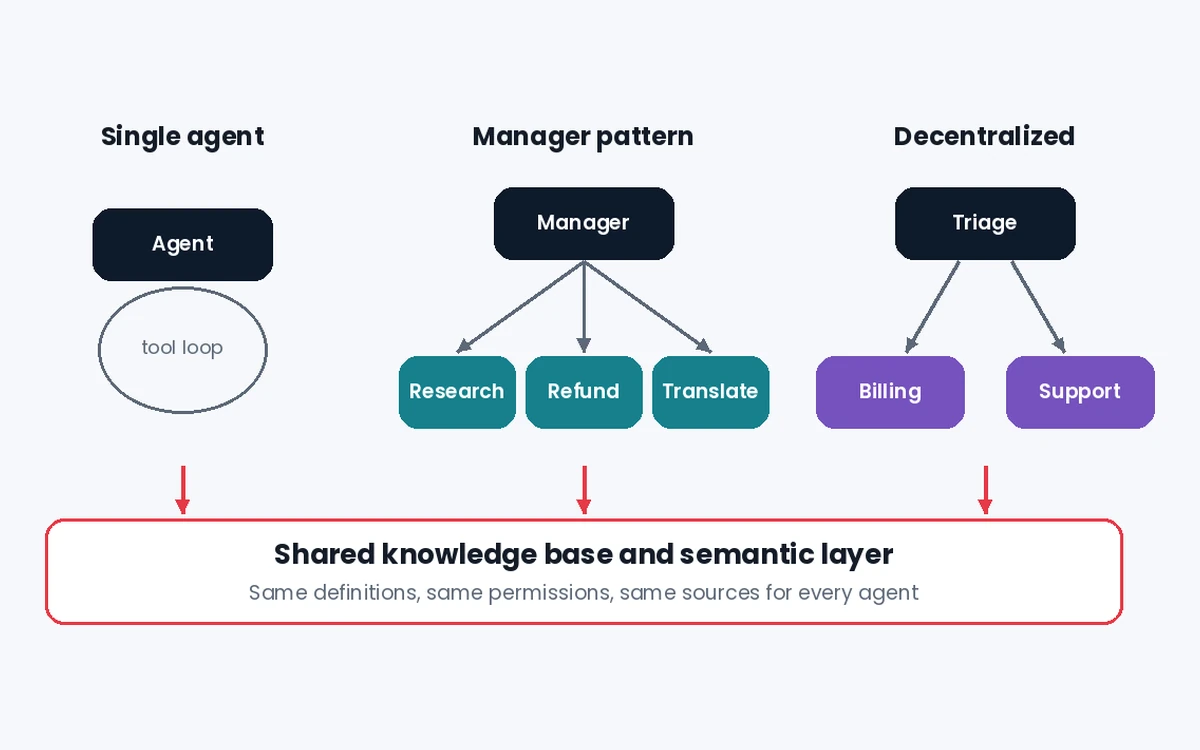
- The manager pattern keeps one agent in charge of the conversation, calling specialist agents as tools, such as a translation agent or a research agent.
- The decentralized pattern passes control between peers, such as a triage agent routing a billing question to a billing agent.
Both patterns break when each agent keeps a private memory of shared terms. One shared knowledge base with one semantic layer keeps every agent reading the same definitions, which removes multi-agent memory silos at the source. Teams that build AI agents across several departments should plan that shared layer at the start of any AI agent development project.
Guardrails
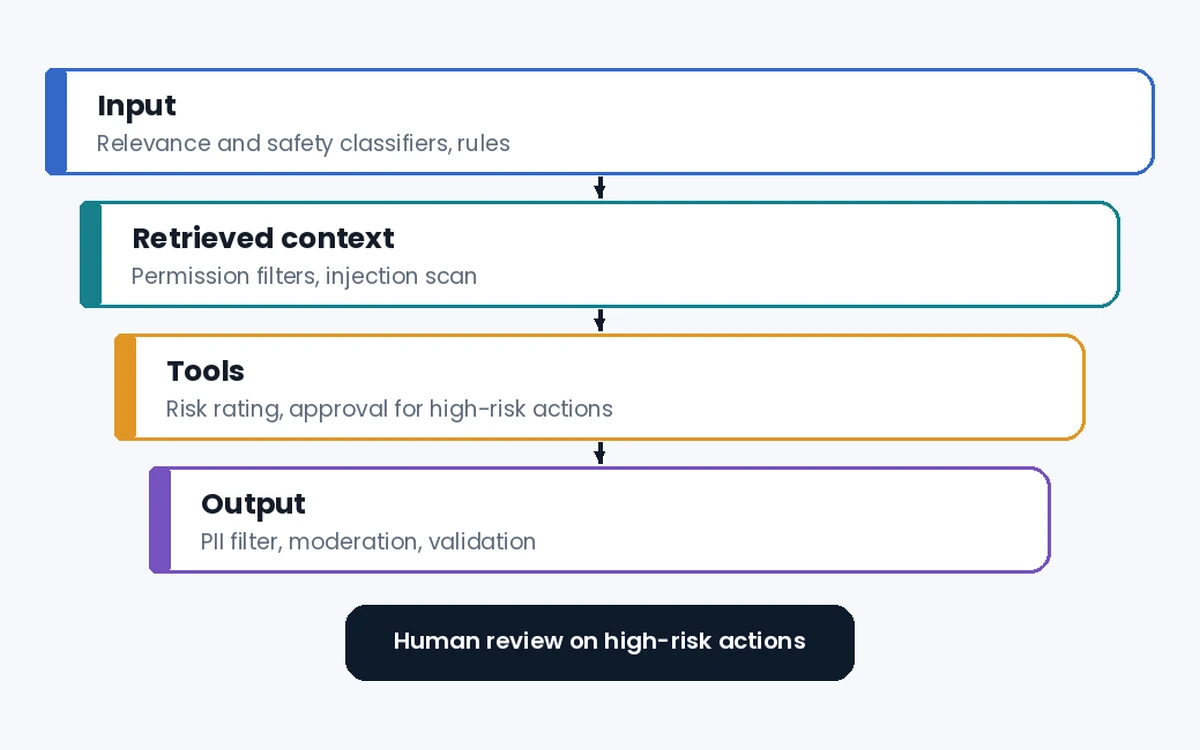
Guardrails are layered checks that keep an agent's inputs, retrieved context, and actions inside safe limits, pairing model-based classifiers with fixed rules.
Types of Guardrails
- A relevance classifier flags questions outside the agent's scope.
- A safety classifier catches jailbreaks and prompt injection, including instructions hidden inside retrieved documents.
- A PII filter removes personal data from outputs that should not carry it.
- Moderation screens harmful or abusive content in both directions.
- Tool safeguards rate each tool by risk, such as read-only versus write access or reversible versus final actions.
- Rules-based protections apply blocklists, input length limits, and regex patterns for known threats.
- Output validation checks each response against policy and brand rules before the user sees it.
Retrieved text deserves the same scrutiny as user input. A poisoned wiki page can carry instructions aimed at the agent, so the cleaning stage in Step 2 strips or flags imperative text from untrusted sources. The NIST AI RMF gives a voluntary structure for mapping, measuring, and managing these risks across the system's life.
Building Guardrails
Build guardrails around the risks you already know, then add new ones as real failures surface in testing and production.
- Start with data privacy and content safety for every agent.
- Add a targeted check for each failure the evaluation suite uncovers.
- Tune each guardrail for security and user experience together, so legitimate requests still go through.
- Plan two triggers for human intervention: an agent exceeding its retry or action limit, and any high-risk action such as a large refund or an account closure.
How to Scale Your Knowledge Base for Enterprise AI
Scaling an enterprise AI knowledge base is mostly a freshness, access, and integration problem. Vector indexes and rerankers scale with standard engineering practice, while stale content and permission gaps multiply with every new source. Enterprise knowledge bases that hold up across departments solve those three issues before adding more content.
How Do You Keep Knowledge Current as Your Organization Changes?
Keep knowledge current by building freshness monitoring into ingestion: track last-modified dates, set staleness thresholds per knowledge type, and re-ingest whenever a source changes.
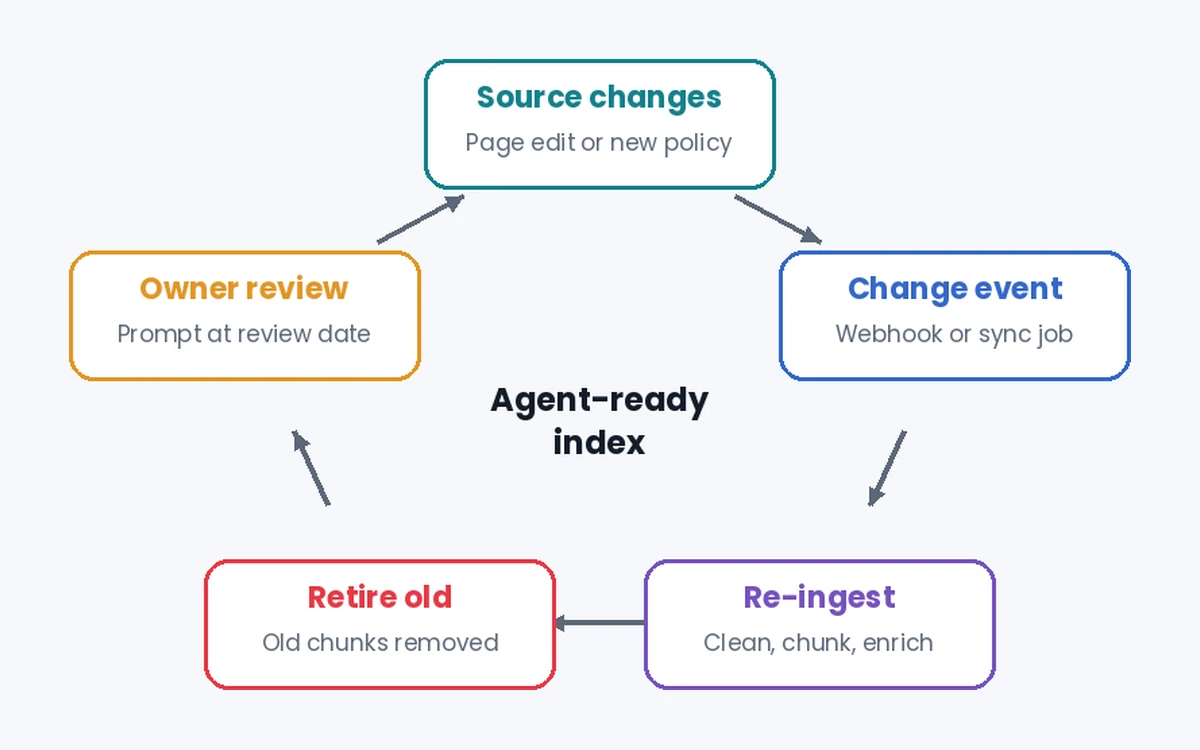
A dynamic knowledge base listens for change events, such as a page edit or a new policy version, instead of waiting for a nightly batch. Regulatory content needs review whenever a law changes, while benefits content follows an annual renewal cycle. Owners get review prompts once a chunk passes its review date, so retired content leaves the index before an agent serves it.
Operational monitoring covers five signals in production: retrieval calls that return nothing relevant, stale documents still being served, latency per step, blocked access attempts, and shifts in faithfulness scores. A sudden rise in empty retrievals usually points to a new topic users ask about that no source covers yet.
How Do You Govern Access to Sensitive Knowledge?
Govern access at the retrieval layer by passing the requester's identity and role with every query, then returning only chunks that person is cleared to see. Attribute-based rules, described in NIST SP 800-162, let one policy combine role, department, region, and data classification without a separate index per team. The semantic layer needs its own policies on top, stating which agents may read which definitions.
How Do You Connect Your Knowledge Base to Enterprise Data Systems?
Connect through one context layer that exposes documents, definitions, and live data behind a single interface, so an agent makes one call wherever the answer lives. MCP servers fit this role, with one server for the document index, another for the glossary, and API connectors for systems such as the CRM or ERP.
Legacy systems without clean APIs often need a modernization step first, which our custom software development team covers. Internal portals where employees ask questions belong in the same plan, and our web development team builds those front ends.
Why the Governed Semantic Layer Separates Demo Knowledge Bases From Production Ones
A production knowledge base shows its value when one question passes through every layer, and the semantic layer is the step a demo usually skips. Most advice on how to build AI agents stops at retrieval, so the hypothetical walkthrough below follows a single HR question through every layer.
- An employee in Texas asks the support agent how many paid caregiver leave days she has left this year.
- The agent checks her identity and role, which limits retrieval to HR content cleared for all employees in her region.
- Hybrid retrieval pulls the current leave policy chunk, and the reranker drops an older version flagged as superseded during cleaning.
- The semantic layer returns the certified definition of eligible tenure, so the agent applies the same rule HR uses.
- A structured data tool reads her tenure and remaining balance from the HR system through an API.
- The agent answers with the number, cites the policy section, and offers a handoff to HR for any exception request.
Each layer removes one way to be wrong: permissions stop leaks, cleaning stops stale text, the glossary stops inconsistent rules, and the live lookup stops guessed numbers. A demo built on vector search alone covers only step 3.
Interested in Bringing AI Agents to Your Business?
O2SOFT starts knowledge base projects with a source readiness review, then maps one use case and its real questions before choosing a store or a model. Our AI development services team builds the ingestion, retrieval, and evaluation layers, while UI/UX design shapes the screens where employees ask questions and review sources. The work follows a staged delivery process, and our case studies show products shipped since 2012. Book a free consultation to scope your first agent.
Conclusion
An enterprise knowledge base building methodology for AI agents turns scattered company knowledge into a governed source that agents query when they answer. The five steps run in one order: map the six knowledge types, ingest and enrich documents, build hybrid retrieval with reranking, add a governed semantic layer, then evaluate before launch.
Guardrails, freshness monitoring, and query-time permissions keep the system trustworthy once real users arrive. Teams getting started with AI agents can begin with one use case and 50 real questions, then add sources only after the evaluation suite passes.
FAQs About How to Build a Knowledge Base for AI Agents
What Is an AI Agent Knowledge Base?
An AI agent knowledge base is the structured, queryable store of company knowledge an agent retrieves from at inference time. The store supports documents, definitions, lineage, and policies, with access control and a governed semantic layer next to the document index.
What Is RAG and How Does It Relate to a Knowledge Base for AI Agents?
RAG retrieves context from an external store before a language model responds, so RAG is the mechanism and the knowledge base is the source. Accurate RAG on enterprise data depends on the ingestion, retrieval, and governance layers described in the five steps.
What Is the Difference Between a Vector Store and a Knowledge Base?
A vector store retrieves embeddings by similarity and forms one component of a knowledge base. A complete knowledge base adds ingestion, keyword search, reranking, access control, freshness monitoring, and a governed semantic layer.
How Do You Evaluate an AI Agent Knowledge Base Before Production Deployment?
Measure retrieval with precision@K and recall@K, then score answers for faithfulness with automated judges plus human review. Set the passing thresholds before writing inference code, and deploy only when both layers clear them.
How Do You Handle Access Control in an AI Agent Knowledge Base?
Pass the requester's identity and role with every query, then filter results to what that person may see. Governed policies on the semantic layer specify which agents can read which definitions, a common requirement in regulated industries.
How Do You Create an AI Agent?
To create an AI agent, define one workflow, pick a model, give it retrieval and action tools, write step-by-step instructions, then test against real questions. Guides on how to create AI agents differ on frameworks, yet every reliable build starts with a knowledge base the agent can query.
How Do You Create an Agent in ChatGPT?
Paid ChatGPT plans let users build a custom GPT in the GPT editor by writing instructions, uploading reference files as knowledge, and switching on tools. Learning how to create an agent in ChatGPT is a fast prototype path, though uploaded files still need owners, versions, and testing before company-wide use.
What Is a Dynamic Knowledge Base?
A dynamic knowledge base updates its index from change events in source systems instead of fixed batch loads. Edited pages get re-ingested, retired versions leave the index, and owners receive prompts when content passes its review date.
How Do You Use AI Agents With an Enterprise Knowledge Base?
Use AI agents with an enterprise knowledge base by giving each agent a retrieval tool scoped to its domain and permissions. Learning how to use AI agents well means checking their cited sources, reviewing escalations, and feeding wrong answers back into the evaluation set.
What Is Enterprise Knowledge Management AI?
Enterprise knowledge management AI applies retrieval, classification, and language models to capture, organize, and serve company knowledge at scale. Agents become the main consumers, which is why enterprise knowledge bases now need machine-readable structure, metadata, and owners.